 PocketSEO
Get your new website crawled by ChatGPT in hours

Klaas @forgebitz
Key Takeaway
Pasting your website URL into ChatGPT's web interface can trigger OpenAI's crawler (OAI-SearchBot) to visit your site within hours. This is useful for new domains that lack backlinks and would otherwise wait weeks for organic discovery. Before trying it, confirm OAI-SearchBot is not blocked in your robots.txt and that your key pages are internally linked from the homepage. This is a one-time indexing trigger, not a substitute for building content that earns ongoing visibility in AI-generated search results.
What does prompting ChatGPT with your URL actually do?
When you paste your website URL into ChatGPT's web interface, OpenAI's crawler (OAI-SearchBot) may fetch the page shortly after. Several site owners have reported their domains appearing in ChatGPT's browsing index within 12 hours of doing this. It's not a guaranteed indexing pipeline, but it's a fast, free way to signal your site's existence to OpenAI's infrastructure.
This matters more now that ChatGPT search is live and pulling real-time results for millions of queries. Getting crawled early means your content has a shot at appearing in AI-generated answers.
How do you do it?
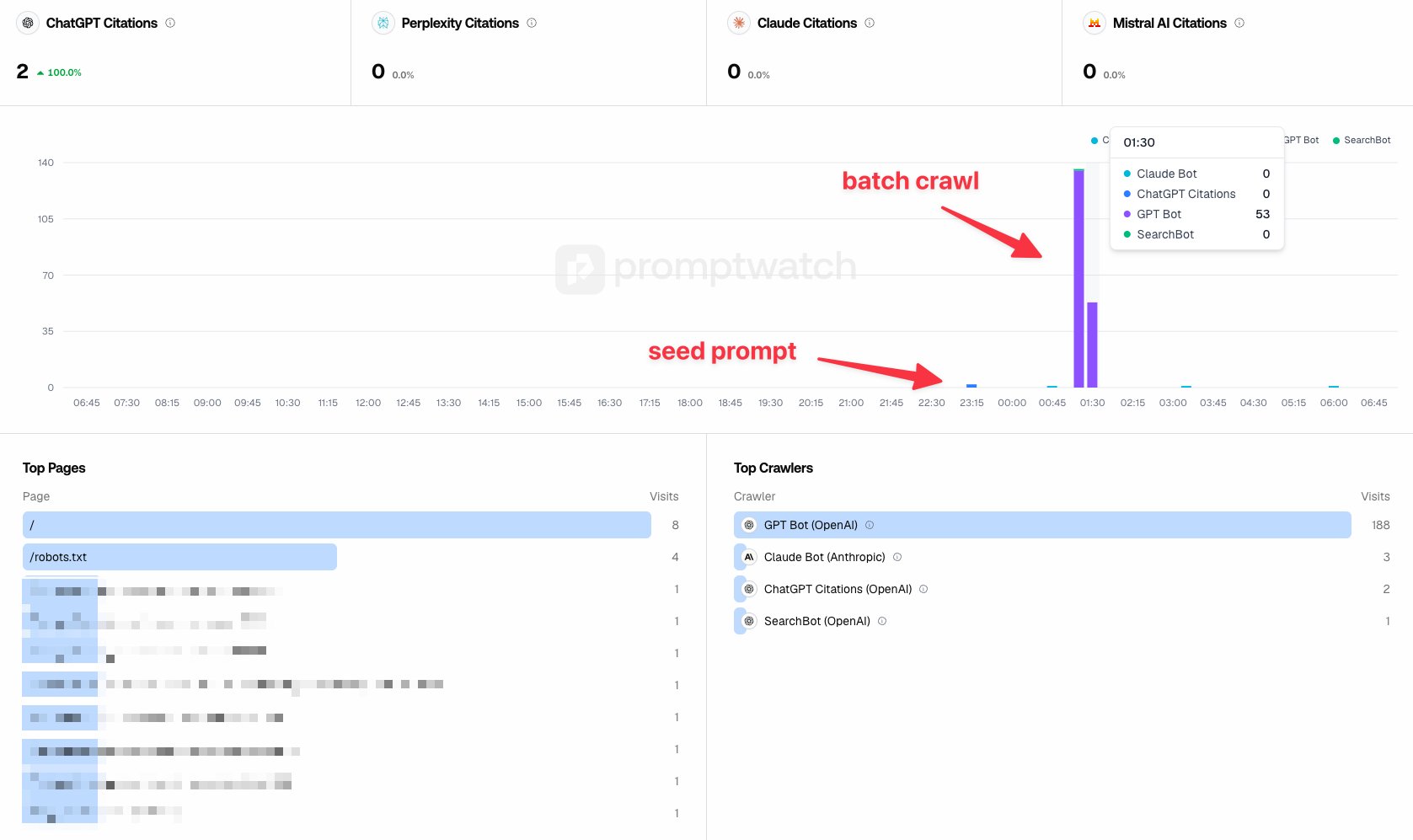
- Open ChatGPT (the web UI at chat.openai.com — not the API)
- Type a message that includes your full URL, such as: "What can you tell me about [https://yoursite.com]?"
- If ChatGPT has browsing enabled, it may visit the URL directly. Even if it doesn't browse in that session, the URL is logged and OAI-SearchBot often crawls it within hours
- Check your server logs or a tool like Cloudflare's traffic analytics for a request from
OAI-SearchBot— that's confirmation the crawler visited
Why does this work?
OpenAI's crawler follows links and processes URLs submitted through user interactions. Pasting a URL into the UI appears to add it to a crawl queue faster than waiting for OAI-SearchBot to discover it organically through backlinks.
According to OpenAI's own documentation, OAI-SearchBot respects robots.txt and crawls pages to populate ChatGPT's search and browsing features. New domains with no backlinks can take weeks to get picked up through normal discovery — this shortcut skips that wait.
What should you check before doing this?
- Your robots.txt: Make sure you haven't blocked
OAI-SearchBot. If you haveUser-agent: *withDisallow: /, ChatGPT's crawler won't index anything - Your key pages are linked: The crawler will follow internal links from your homepage, so make sure your most important pages are reachable within one or two clicks
- Your page loads fast: A slow or broken page may get crawled but not retained in the index. Run it through PageSpeed Insights first
Is this a long-term strategy?
No. Think of it as a one-time trigger for new sites. Once OAI-SearchBot has crawled your domain, it will recrawl on its own schedule based on how often you publish and how your site performs in ChatGPT responses.
For ongoing visibility in AI search, focus on writing content that directly answers specific questions. According to a 2024 Search Engine Journal analysis, AI search tools heavily favor pages that give clear, self-contained answers over pages that bury conclusions in long prose.
This trick gets you in the door. Quality content keeps you there.
 Get the weekly SEO digest