 PocketSEO
Test if LLMs can see your website content (JavaScript dependency check)
Reviewed Jul 2026
Key Takeaway
Testing your website without JavaScript reveals what AI search engines actually see when crawling your content. Many sites load critical elements like product descriptions, reviews, or navigation through JavaScript, making them invisible to LLMs that don't render scripts. Use Chrome DevTools to disable JavaScript, then extract all visible text with console.log(document.body.innerText) to identify gaps. Compare this output with your JavaScript-enabled version to spot missing content that could hurt your AI search visibility.
Why does JavaScript dependency matter for LLM visibility?
Large Language Models (LLMs) like ChatGPT, Claude, and Google's Gemini don't always render JavaScript when analyzing websites.
If your key content relies on JavaScript to display, AI search engines might miss it entirely.
This creates a blind spot that could hurt your visibility in AI-powered search results.
How do you test if LLMs can actually see your website content?
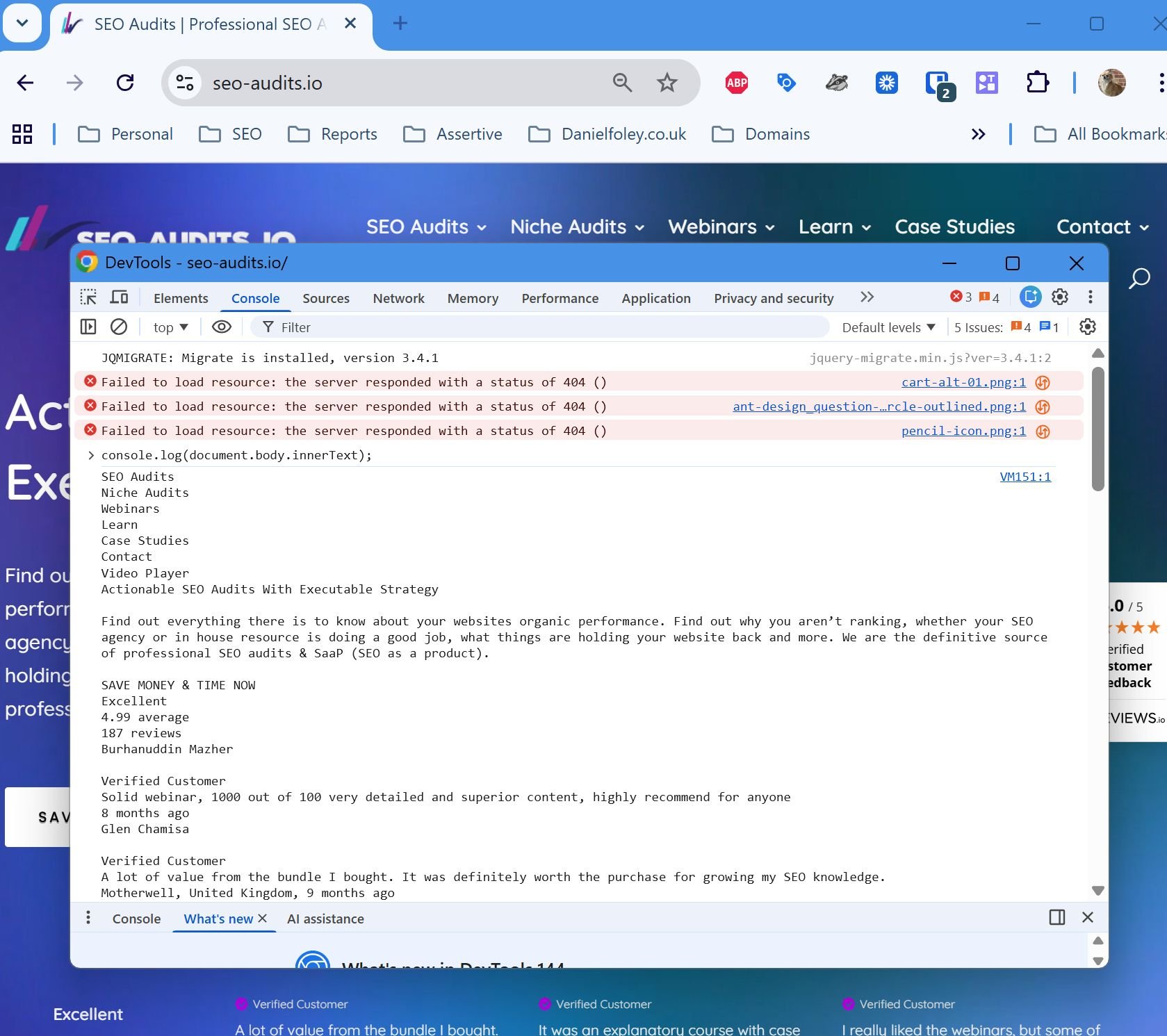
Here's a simple way to see exactly what text an LLM can access from your pages:
- Open the page you want to test in Chrome
- Press F12 to open Developer Tools
- Click the Elements tab, then press Ctrl + Shift + P
- Type "java" in the search box and select "Disable JavaScript"
- Refresh the page
- Switch to the Console tab and paste this code:
console.log(document.body.innerText); - Press Enter to see all visible text
How does content differ between JavaScript and non-JavaScript versions?
To find missing content:
- Save the output from step 7 to a text file (let's call it "no-js.txt")
- Re-enable JavaScript by refreshing and repeating steps 3-4, but select "Enable JavaScript"
- Run the same console command and save this output ("with-js.txt")
- Upload both files to ChatGPT, Claude, or Gemini
- Ask the AI: "Compare these two files and highlight what content is missing from the first one"
What will you discover about your site's LLM accessibility?
This test reveals:
- Navigation menus that don't load without JavaScript
- Product descriptions rendered dynamically
- Review sections that appear via AJAX
- Key calls-to-action hidden behind JavaScript
- Blog content loaded asynchronously
What are the quick fixes when LLMs can't see your content?
If you find critical content missing:
- Add server-side rendering for essential text
- Use progressive enhancement instead of JavaScript-dependent content
- Include key information in HTML meta tags
- Consider adding text alternatives for JavaScript-heavy sections
This 10-minute test could reveal why your content isn't showing up in AI search results.
Want the full playbook? Read our guide on JavaScript Mobile SEO: Fix Rendering Before It Kills Rankings.