 PocketSEO
How Robots.txt Specificity Rules Work in Technical SEO
Reviewed Jul 2026
Key Takeaway
Robots.txt follows path specificity, not top-to-bottom order, so a precise Allow rule always overrides a broad Disallow regardless of position.
Understanding Robots.txt Specificity
Robots.txt files don't just follow commands in order — they follow a hierarchy based on specificity.
When you have conflicting directives, search engines will always prioritize the most specific rule over general ones.
How the Specificity Rule Works
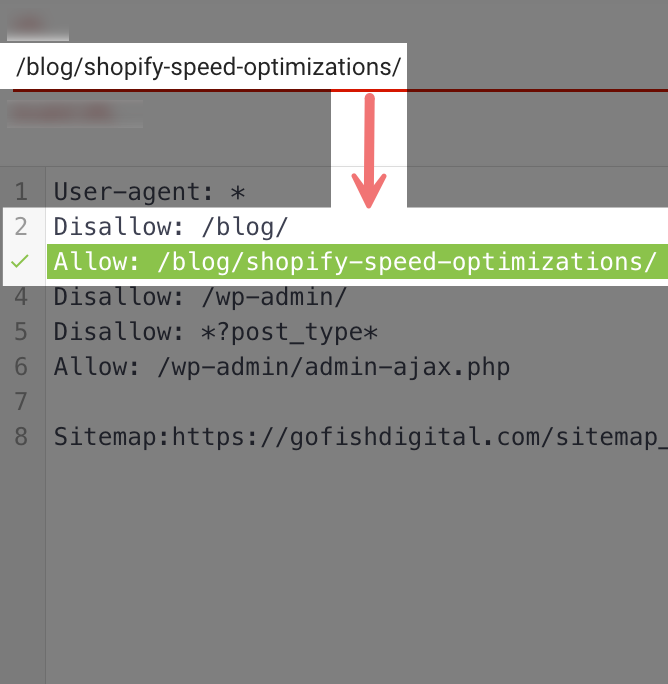
Think of it like a filing system. If you have a rule that says "block everything in the filing cabinet" but another rule that says "allow access to this specific drawer," the specific drawer rule wins.
Here's the technical breakdown:
- General rule:
Disallow: /blog/(blocks entire blog directory) - Specific rule:
Allow: /blog/shopify-speed-optimizations/(allows one specific page) - Result: The specific page gets crawled despite the general block
Practical Examples for Your Site
Example 1: Blocking Admin Areas with Exceptions
Disallow: /admin/
Allow: /admin/public-stats/
This blocks all admin pages except your public statistics page.
Example 2: Seasonal Content Management
Disallow: /holiday-2023/
Allow: /holiday-2023/evergreen-gift-guide/
Blocks old holiday content but keeps your evergreen gift guide accessible.
Example 3: User-Generated Content Control
Disallow: /user-profiles/
Allow: /user-profiles/featured/
Prevents indexing of all user profiles except featured ones.
Common Mistakes to Avoid
Don't assume robots.txt follows top-to-bottom order like CSS. The most specific path always wins, regardless of where it appears in your file.
Test your robots.txt logic using Google Search Console's robots.txt tester before going live. This prevents accidental blocking of important pages.
Quick Implementation Tip
When setting up conflicting rules, write the general rule first, then add specific exceptions below. While order doesn't matter for functionality, this structure makes your robots.txt easier to read and maintain.
Want the full playbook? Read our guide on Google Search Console: Setup to Your First SEO Win (20-Minute Guide).