 PocketSEO
Cloudflare AI Bot Policy Could Block Googlebot — Fix It Now

Suganthan Mohanadasan @suganthan
Key Takeaway
Cloudflare's AI bot policy 'block training' option also blocks Googlebot, Applebot, and BingBot because they are classified as multi-purpose crawlers that combine search with training. To prevent your site from being deindexed, go to Security → Settings → Configure AI bot policies in Cloudflare and set the Training section to 'Allow (do not block)'. Confirm the fix worked by checking crawl stats in Google Search Console.
What is the Cloudflare AI bot policy and why does it matter for SEO?
Cloudflare added an AI bot management feature that lets site owners block crawlers used for AI training. The problem: the 'block training' option doesn't just block AI scrapers. It also blocks crawlers classified as multi-purpose, meaning bots that combine search indexing with training data collection.
Googlebot, Applebot, and BingBot all fall into this category.
If you have 'Block' selected under the Training section of Cloudflare's AI bot policies, those crawlers will be denied access to your site. No crawling means no indexing. No indexing means your pages disappear from search results.
How do you check and fix this setting?
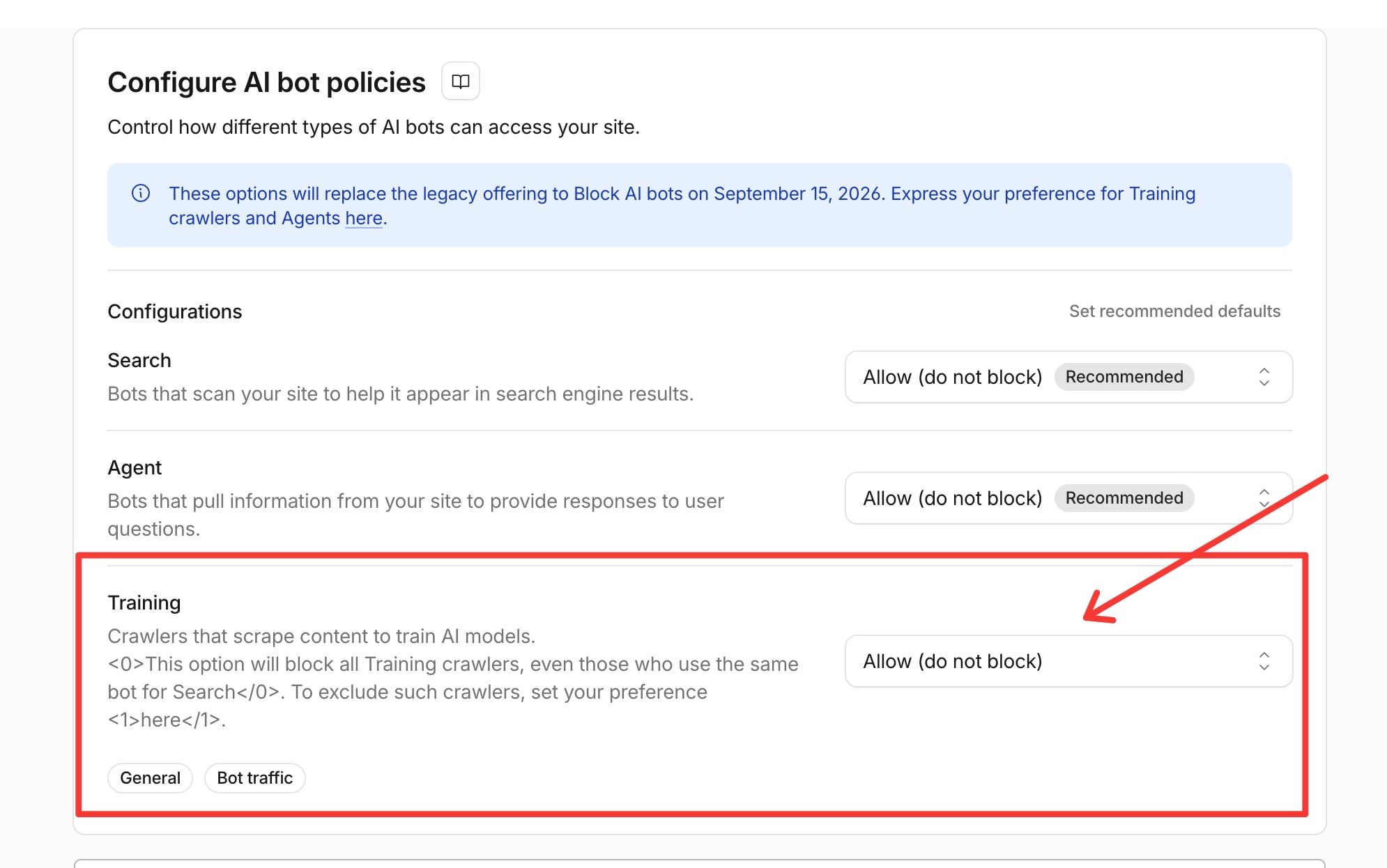
- Log in to your Cloudflare dashboard
- Select the domain in question
- Go to Security → Settings
- Find Configure AI bot policies
- Under the Training section, confirm 'Allow (do not block)' is selected
- Save your changes
That's the entire fix. Takes under two minutes.
Who does this affect?
Anyone running a site behind Cloudflare who may have turned on bot blocking without fully reading the implications. This is common if you or a developer enabled the setting after seeing news about AI companies scraping content for model training. The intent was reasonable; the side effect was not.
According to W3Techs, Cloudflare is used as a reverse proxy by over 19% of all websites, making this a widespread risk for site owners who aren't actively monitoring their crawl settings.
What should you tell your developer?
If you don't have direct access to Cloudflare, send your developer or DevOps team this exact path:
Security → Settings → Configure AI bot policies → Training → Set to 'Allow (do not block)'
Ask them to confirm the change is saved and check Google Search Console shortly after to verify Googlebot is still crawling normally. You can do this under Settings → Crawl stats in Search Console.
How do you confirm Googlebot can still access your site?
After updating the setting, run a quick check:
- Open Google Search Console → Settings → Crawl stats and look for recent Googlebot activity
- Use the URL Inspection tool on a key page and hit 'Test Live URL' to confirm Google can fetch it
- Check your server logs for Googlebot user-agent hits if you have log access
If crawl activity dropped off recently and you have Cloudflare blocking enabled, this is likely the cause.
Want the full playbook? Read our guide on Google Search Console: Setup to Your First SEO Win (20-Minute Guide).