 PocketSEO
Stop Blocking Your Best Backlinks: The Robots.txt Parameter Audit
Reviewed Jul 2026
Key Takeaway
Your robots.txt might be killing backlinks to parameter URLs like product pages with UTM codes or referral parameters. Check Ahrefs backlinks filtered by your blocked patterns (like "?" for all parameters) to see what link equity you're losing. Instead of blanket blocking with rules like "Disallow: /*?", use selective Allow statements for specific parameter URLs that receive quality backlinks. This preserves link value from high-authority domains while still controlling duplicate content on unimportant parameter variations.
What hidden problem is killing your link value?
You're getting great backlinks, but your robots.txt file might be blocking them from passing value. This happens when external sites link to URLs with parameters that you've disallowed in robots.txt.
Many sites block parameter URLs to prevent duplicate content issues, but they accidentally block valuable backlinks in the process.
According to Ahrefs, websites typically lose access to 16-25% of their backlink equity due to improper robots.txt configurations.
How do you find blocked backlinks in your robots.txt?
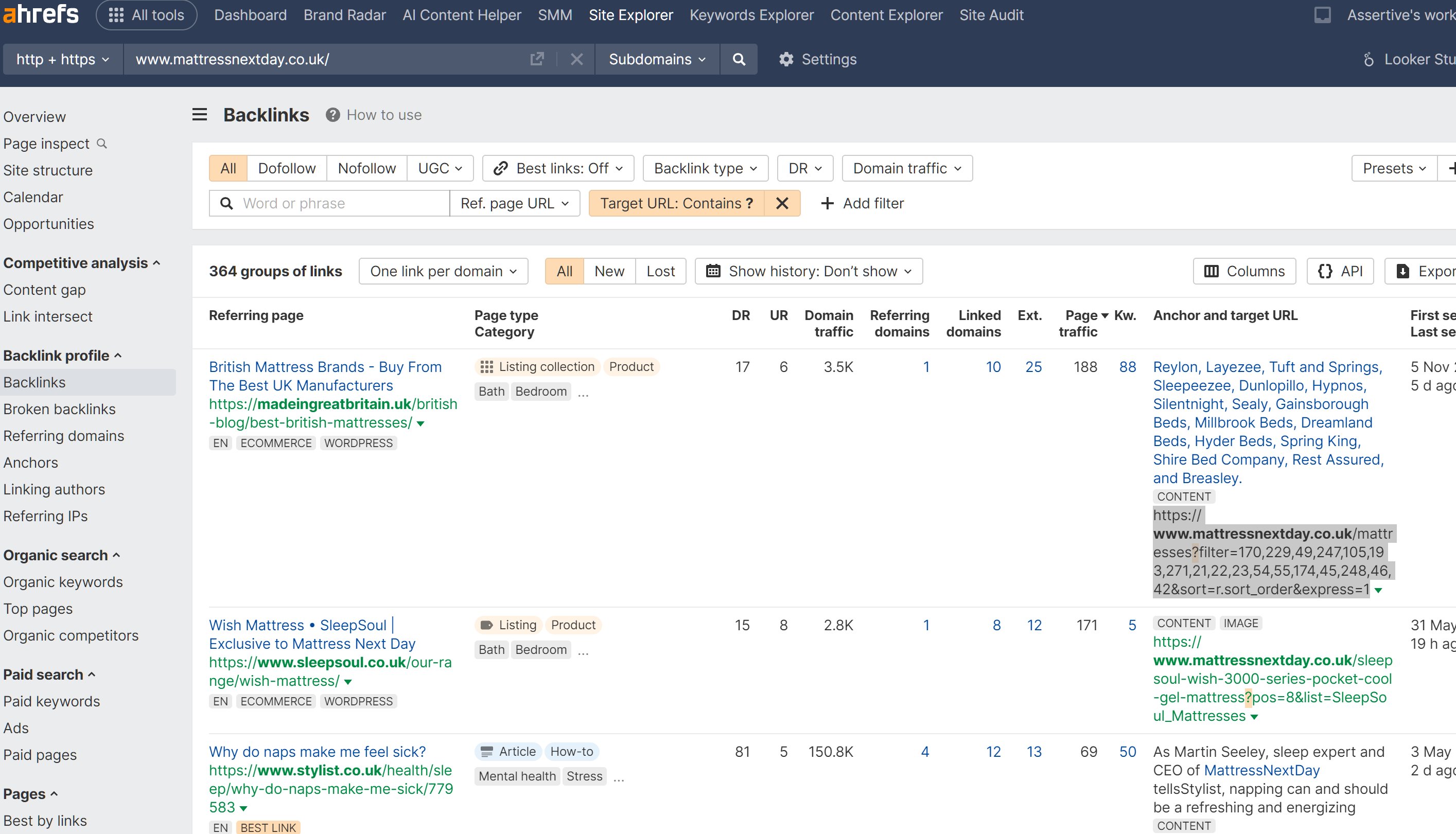
Here's the step-by-step audit:
- Open Ahrefs and go to your Backlinks report
- Click "+ ADD FILTER"
- Select "Target URL" and choose "contains"
- Check your robots.txt file for disallowed parameter patterns
- Test each pattern by pasting it into the Ahrefs filter
For example, if your robots.txt contains Disallow: /*?, paste ? into the Target URL filter. This shows all backlinks to URLs with parameters.
What are the most common blocked parameter patterns?
Look for these in your robots.txt:
/*?(blocks all parameters)/*utm_(blocks UTM tracking)/*ref=(blocks referral parameters)/*sort=(blocks sorting parameters)
How do you selectively allow parameters in robots.txt?
Instead of blocking everything, use specific Allow rules:
User-agent: *
Disallow: /*?
Allow: /product-page?utm_source=partner
Allow: /landing-page?ref=external
When is fixing blocked backlinks worth the effort?
This matters most when:
- You have high-authority backlinks to parameter URLs
- The linking domains have significant trust and relevance
- The parameter URLs receive substantial external link equity
How do you make the trade-off decision for parameter blocking?
Weigh these factors:
- Link value gained vs. duplicate content risk
- Manual work required vs. automated parameter handling
- Canonical tag effectiveness vs. robots.txt simplicity
For most sites, selectively allowing valuable parameter URLs beats blanket blocking. Your backlink profile will thank you.
Want the full playbook? Read our guide on Google Search Console: Setup to Your First SEO Win (20-Minute Guide).