
PocketSEOPocketSEO

Best E-commerce SEO Tips (2026)

6 tips · ~10 min read · 2,467 words · Updated 2026

E-commerce SEO has unique challenges that general SEO advice doesn't address. Product pages, category architecture, faceted navigation, duplicate content from filters, product schema markup, and the constant churn of inventory all require specialized tactics. These tips come from practitioners who have ranked product pages and category listings in competitive niches — from Shopify stores to enterprise marketplaces.

Beginner Medium Effort

Do you need thousands of clicks to make SEO pay off?

Not if you're selling the right products. Brands selling saunas, fire pits, wine coolers, and BBQ grills consistently generate strong returns from SEO — and most of them rank for keywords with fewer than 2,000 monthly searches.

The math is straightforward. When your average order value sits above $1,000, you don't need massive traffic. You need the right traffic.

Why do low-volume keywords work so well for expensive products?

High-ticket product categories are full of specific, low-competition keywords that are easy to rank for — and each one represents buyers with serious purchase intent.

Take the fire pit category as an example. Keywords like these each pull between 1,700 and 2,000 monthly searches:

  • steel fire pit
  • concrete fire pit
  • portable fire pit

Rank #1 for any single one of them and you're looking at roughly 400-600 clicks per month. At a 0.5% conversion rate on a $2,000 product, that's 2-3 sales — from one keyword.

Now stack 5-10 of those rankings and the numbers get hard to ignore.

How do you find these keywords?

Start with your product attributes. Materials (steel, concrete, cast iron), sizes (small, large, portable), and use cases (propane, wood-burning, tabletop) all generate separate keyword clusters with their own search volume.

A few approaches that work:

  1. Pull from autocomplete. Type your core product term into Google and note every suggestion. Each one is a real search people make.
  2. Check "People also ask." These surface adjacent intent — questions buyers have before they purchase.
  3. Look at competitor category pages. Tools like Ahrefs or Semrush show which low-volume terms your competitors rank for that you don't.
  4. Mine your own Search Console data. If you already have some rankings, the queries report will show long-tail variations driving impressions that you haven't fully targeted yet.

According to Ahrefs, 92% of keywords get fewer than 10 monthly searches — which means the search universe is dominated by long-tail, specific queries. High-ticket products are well-positioned to target exactly those terms.

What does a realistic SEO target look like?

If you sell a product with an average order value of $1,500 and you rank #1 for 10 long-tail keywords averaging 1,500 monthly searches each:

  • Estimated traffic: ~4,000-6,000 clicks/month
  • Conversion rate: 0.5-1%
  • Sales: 20-60 units
  • Revenue: $30,000-$90,000/month from organic alone

Those numbers are achievable for a small brand that targets the right keywords consistently, builds a few solid category and collection pages, and earns some links in their niche.

Is SEO worth it if you sell high-ticket products?

If your product costs more than $500 and has specific attributes buyers search for, SEO is one of the highest-ROI channels available. You're not competing against e-commerce giants for head terms with millions of searches. You're picking off specific, high-intent queries where a focused content and product page strategy can realistically land you on page one.

Want the full playbook? Read our guide on Ecommerce SEO Quick Wins: Rank Higher in Days.

Key Takeaway

High-ticket product sellers — think saunas, fire pits, and BBQ grills with average order values above $1,000 — can build profitable SEO channels without high traffic volume. By targeting low-competition, long-tail keywords (often under 2,000 monthly searches), a single #1 ranking can deliver 400-600 clicks and 2-3 sales per month. Stack 5-10 of those rankings and SEO becomes one of the highest-ROI marketing channels available to small e-commerce brands.

Source: @SEOKeval on Twitter/X

Full tip page
Intermediate Medium Effort

Why does deleting blog content actually help SEO?

For most ecommerce stores, the blog is a graveyard. Posts that never ranked, never drove traffic, and never converted — but they still eat crawl budget every time Googlebot visits.

For a wallpaper brand that recently asked for an SEO overhaul, the first move was cutting 90% of their blog content. Not reformatting it, not adding more words to it — deleting it. If a page has no rankings and no traffic, keeping it alive costs more than removing it.

According to Ahrefs, the majority of pages on the web get zero organic traffic. For ecommerce sites with thin or off-target blog posts, a content audit and mass deletion is often the fastest way to free up crawl budget for pages that actually matter.

How do you handle a spam backlink problem?

This brand had two separate surges of spammy backlinks over the past year. Left alone, these kinds of links can drag down keyword rankings site-wide.

The fix: build a disavow file and submit it through Google Search Console. It's not instant, but it removes low-quality signals that may be suppressing the site's authority on competitive terms.

This step isn't always necessary, but when you can see clear spikes in toxic links tied to ranking drops, disavowing is worth doing before any other off-page work.

Which category pages should you optimize first?

Before building anything new, the brand had existing collection pages sitting just off page one for high-volume keywords:

  • black wallpaper — 105k monthly searches
  • bathroom wallpaper — 19k monthly searches
  • laundry room wallpaper — 2.7k monthly searches

These pages are already indexed and partially trusted by Google. A small push can move them onto page one.

For each page, the optimization checklist is straightforward:

  1. Add the target keyword to the H1
  2. Update the meta title to include the keyword near the front
  3. Rewrite the meta description with the keyword and a clear value proposition
  4. Clean up the URL slug to match the target keyword
  5. Add 400-500 words of keyword-relevant content below the product grid, with internal links to related collection pages

That last step is important. Google needs content to understand what a category page is about. A grid of product images with no text gives crawlers very little to work with.

When should you build new collection pages?

Once the existing pages are optimized, the next move is expansion. This brand already had collection pages covering colors and rooms. But there's a long tail of intent-driven keywords with real search volume that had no dedicated pages:

  • boho wallpaper
  • rainbow wallpaper
  • baby wallpaper
  • mountains wallpaper

Mapping out 100+ additional collection pages targeting a combined 250k monthly searches is a medium-term project, but each page compounds over time.

How should you build backlinks to a new ecommerce site safely?

The link-building strategy here is deliberately conservative:

  • 70-80% of links go to the homepage
  • 20-30% go to collection pages
  • No more than one link built to any single collection page at a time
  • 50/50 split between branded anchors and keyword-rich anchors

This distribution keeps the link profile looking natural and avoids over-optimization signals that can trigger algorithmic penalties. Building too many keyword-anchored links to category pages too fast is a common mistake that causes short-term gains followed by ranking drops.

Want the full playbook? Read our guide on Product Category Pages That Actually Drive Traffic (Not Just Look Pretty).

Key Takeaway

For ecommerce SEO, the fastest wins come from auditing and cutting underperforming blog content, disavowing spam backlinks, and optimizing existing category pages that already rank on page two. Add the target keyword to the H1, meta title, meta description, and URL, then add 400-500 words of supporting content below the product grid. New collection pages targeting long-tail terms and a conservative link-building strategy covering both the homepage and category pages build compounding authority over time.

Source: @SEOKeval on Twitter/X

Full tip page
Beginner Medium Effort

The Untapped Goldmine: Collection Pages Stuck in SEO Limbo

Your Shopify store has collection pages ranking between positions 5-15 on Google. These pages are frustratingly close to the top but not quite there. Here's how to push them into the top 3 spots using a simple content enhancement strategy.

Why Positions 5-15 Are Your Best Opportunity

Boost Shopify Collection Pages from Position 5-15 to Top 3 with AI Content

Pages ranking in positions 5-15 already have Google's attention. They're indexed, they're relevant, and they're competing. They just need that final push to break into the coveted top 3 results where most clicks happen.

According to Backlinko, pages ranking in the top 3 positions capture around 75% of all clicks for a keyword.

Think of these pages as low-hanging fruit. You're not starting from zero — you're optimizing pages that Google already considers worthy of page one.

Step-by-Step Process

1. Find Your Target Pages

  • Open Google Search Console
  • Navigate to Performance > Search Results
  • Filter by "Position" and set range to 5-15
  • Look specifically for collection page URLs (usually contain /collections/)
  • Export this data or take screenshots

2. Enhance Content with Strategic Introductions

Most Shopify collection pages are bare-bones — just a title and product grid. Adding quality introductory content can significantly boost their relevance and user engagement.

Use this prompt in ChatGPT for each collection page:

"Create an introduction for our [collection name] page, highlighting unique features and trends addressed by these products. Aim for an inviting tone to encourage exploration. Follow with a persuasive paragraph summarizing key benefits and a call-to-action to engage further or explore more."

3. Implementation Tips

  • Add the generated content above your product grid
  • Keep it between 150-300 words
  • Include your target keywords naturally
  • Make sure it adds genuine value, not just filler text
  • Test different versions to see what performs best

Why This Works

Collection pages often rank well for commercial keywords but lack the content depth that Google rewards. By adding relevant, helpful introductions, you're:

  • Increasing time on page
  • Reducing bounce rate
  • Providing more context for search engines
  • Improving user experience

Measuring Success

Track these metrics after implementation:

  • Position changes in Search Console (check weekly)
  • Organic traffic to collection pages
  • Time on page and bounce rate in Google Analytics
  • Conversion rates for the enhanced pages

Most clients see movement within 2-4 weeks of implementation.

Want the full playbook? Read our guide on Product Category Pages That Actually Drive Traffic (Not Just Look Pretty).

Key Takeaway

Add a helpful 150-300 word introduction above bare Shopify collection grids to give pages stuck in positions 5-15 the content depth needed for the top 3.

Source: @bloggersarvesh on Twitter/X

Full tip page
Intermediate Medium Effort

The Shopify Duplicate Content Problem

Shopify creates multiple URLs for the same product by default. When a product appears in multiple collections, each collection generates its own URL path:

  • /collections/shirts/products/blue-t-shirt
  • /collections/sale/products/blue-t-shirt
  • /collections/new-arrivals/products/blue-t-shirt

All three URLs show identical content, creating duplicate content issues that confuse search engines and dilute your ranking power.

The Simple Fix

Shopify offers a clean product URL structure that bypasses collections entirely. Instead of collection-based URLs, use the direct product path:

  • Bad: /collections/shirts/products/blue-t-shirt
  • Good: /products/blue-t-shirt

This creates one canonical URL per product, eliminating duplicates.

Implementation Steps

1. Update Your Theme Files

Find these Liquid template tags in your theme files and replace them:

Replace this:

{{ product.url | within: collection }}

With this:

{{ product.url }}

2. Common Files to Check

  • collection.liquid — Product listings on collection pages
  • product-card.liquid — Product tiles and snippets
  • search.liquid — Search results
  • product-recommendations.liquid — Related product sections

3. Test Your Changes

After updating your theme:

  1. Visit collection pages and hover over product links
  2. Verify URLs show /products/product-name format
  3. Check that links work correctly
  4. Use Google Search Console to monitor crawl errors

Why This Matters

Duplicate content spreads link equity across multiple URLs instead of concentrating it on one page. Google might choose the wrong URL to rank, or worse, penalize pages for duplication.

With clean product URLs, you consolidate all ranking signals into one authoritative page per product. This typically improves product page rankings and makes your site architecture cleaner for both users and crawlers.

Want the full playbook? Read our guide on Ecommerce SEO Strategy: How One Shopify Store Got 3,000% More Traffic.

Key Takeaway

Swap Shopify's collection-based product links for direct /products/ URLs so ranking signals consolidate into one canonical page per product instead of scattering across duplicates.

Source: @MattiSchroder on Twitter/X

Full tip page
Beginner Medium Effort

Why Category Pages Matter More Than Product Pages

If you're running an ecommerce store with 100+ products and SEO isn't driving revenue, you're probably optimizing the wrong pages. Product pages are hard to rank because they compete against Amazon, manufacturer sites, and countless retailers selling identical items.

Category pages are different. They target broader, commercial keywords buyers use when they're ready to purchase but haven't picked a specific product yet.

According to BrightEdge, 68% of online experiences begin with a search engine, so capturing that purchase-intent traffic is where the money is.

Skip Technical SEO (and Blog Content) First

Most SEO advice pushes technical fixes as priority one: crawlability, Core Web Vitals, schema. For ecommerce, that order wastes time. One Shopify store ignored technical SEO entirely and earned $4.8k in extra revenue from 30 optimized collections alone.

Blog content is the other trap. A jewelry brand skipped blogs completely and built category pages instead. Someone reading "how to clean silver jewelry" rarely buys; someone searching "mens silver chains" is ready to purchase.

For most stores under 10,000 monthly visitors, category pages deliver faster, more measurable results than either fix.

The Simple Category Page Formula

Here's the exact approach that increased organic search revenue by 44% across 30 collections in three months:

Above the Product Grid (50 words)

  • Explains what the category contains
  • Includes your target keyword naturally
  • Addresses the main search intent

Below the Product Grid (250-400 words)

  • Explain the different product types in the category
  • Answer common buyer questions
  • Cover material benefits, style guides, care, and sizing
  • Include related keywords naturally

Go Hyper-Specific

Instead of generic pages like "Bracelets" or "Rings," build dedicated pages for variations:

  • Silver chains
  • Mens gold chains
  • Gold bracelets for men
  • Rose gold wedding rings

These longer-tail keywords have lower competition and higher purchase intent. Use Ahrefs or SEMrush to find terms with 500-2,000 monthly searches and keyword difficulty under 30.

Internal Linking & Navigation

  • Link "wireless headphones" to "bluetooth speakers"
  • Cross-link complementary product categories
  • Add new category pages to your main menu so users and crawlers find them

Implementation Priority

Start with your highest-revenue categories first. If you sell 500 products across 20 categories, optimize those 20 category pages before touching individual product pages. Focus 90% of your SEO effort here if you have a large catalog.

Quick Wins to Implement Today

  • Audit your top 10 category pages for missing content
  • Add the 50-word intro if it's missing
  • Write the buyer-intent description below the grid
  • Add 3-5 internal links to related categories
  • Confirm your target keyword appears in the page title

The jewelry brand saw 8 of 10 new category pages hit first-page rankings within 6 months. This works because it targets commercial-intent keywords where you can actually compete and win.

Want the full playbook? Read our guide on Product Category Pages That Actually Drive Traffic (Not Just Look Pretty).

Key Takeaway

Prioritize category pages over product pages, technical fixes, and blog content, adding buyer-intent copy and internal links to capture commercial keywords where you can outrank Amazon.

Source: @KaiCromwell on Twitter/X

Full tip page
Intermediate Medium Effort

The foundation: Collection page optimization

Start with your category pages. Most e-commerce sites treat these as afterthoughts, but they're goldmines for SEO traffic.

Optimize every collection page with:

  • Target keywords in titles and H1s
  • Unique descriptions (not just product lists)
  • Strategic sub-collections for long-tail keywords
  • Internal links between related collections

Build authority with 80/20 backlink strategy

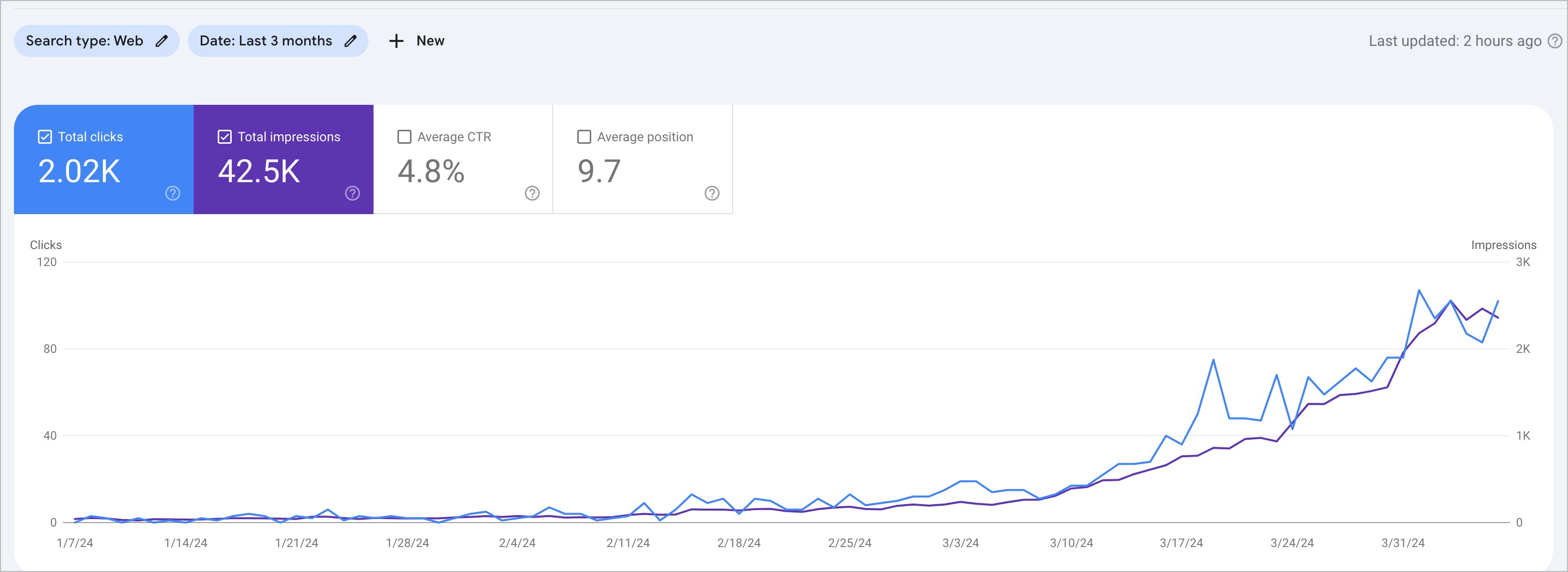
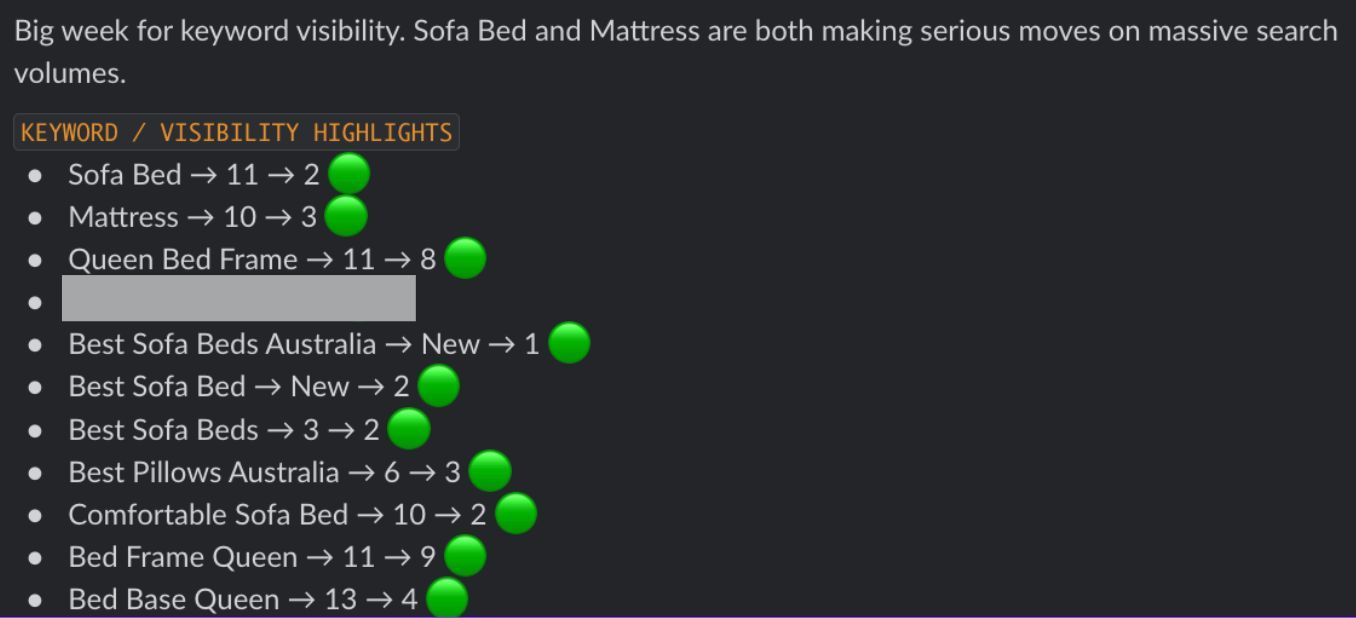
E-commerce SEO basics that got us top 3 rankings in 30 days

Don't spray backlinks everywhere. Focus your efforts:

  • 80% of backlinks to your homepage
  • 20% to specific target collection pages

This builds domain authority while supporting specific pages you want to rank.

The content multiplier effect

Here's where most e-commerce sites miss out. Create supporting content around each major product category:

Competitor comparison posts — "Brand A vs Brand B mattress comparison"

Buying guides — "How to choose the right mattress firmness"

FAQ compilations — Answer every question customers ask

Installation and maintenance guides — "How to set up your new mattress"

Targeted use cases — "Best mattresses for back pain" or "Top picks for stomach sleepers"

Why this works so well

Search engines want to see topic authority. When you create comprehensive content around your products, you signal expertise in that space.

The supporting content also:

  • Captures long-tail search traffic
  • Keeps users on your site longer
  • Creates natural internal linking opportunities
  • Builds trust with potential customers

Implementation timeline

  1. Week 1-2: Optimize existing collection pages
  2. Week 3: Build sub-collections and internal links
  3. Week 4: Start backlink outreach
  4. Week 5-8: Publish 2-3 supporting articles per category

The results compound quickly. Supporting content helps your product pages rank better, while optimized collection pages capture commercial intent searches.

Skip the shiny objects

You don't need expensive AI tools or complex technical setups. Focus on creating genuinely helpful content that answers real customer questions.

The basics work because they align with what search engines actually want: comprehensive, helpful resources that serve users.

Want the full playbook? Read our guide on Ecommerce SEO Quick Wins: Rank Higher in Days.

Key Takeaway

Optimize collection pages with unique descriptions, then surround each product category with buying guides and comparisons that build the topic authority search engines reward.

Source: @KaiCromwell on Twitter/X

Full tip page

Putting these e-commerce seo tips into action

The 6 tips above represent the most validated e-commerce seo advice in the PocketSEO database — each one sourced from a practitioner who shared their finding publicly with their name attached. But reading tips is not the same as implementing them.

Start with the beginner-level quick wins — these are changes you can ship in under an hour that deliver measurable results within weeks. Once your foundation is solid, work through the intermediate and advanced tips systematically. Every tip links to its original source so you can verify the context and adapt the advice to your specific situation.

For more e-commerce seo resources, explore our guides, checklists, and the full tip directory below.

More E-commerce SEO Resources

Best Tips by Category

Get the weekly SEO digest

Get 3 actionable SEO tips every week — free.

Join solo founders leveling up their SEO. Unsubscribe anytime.