 PocketSEO
Ecommerce SEO Quick Wins: Rank Higher in Days
Find keywords already close to page one and push them over the line with targeted on-page fixes.
Last updated: July 3, 2026

Keval Shah | Ecom SEO + AEO @SEOKeval on Twitter/X
Jul 3, 2026 · 5d ago
TL;DR
- Keywords ranking at positions #7-15 are your fastest path to more organic traffic and revenue
- Use Ahrefs (or a similar tool) to find these opportunities and prioritize by search volume and product importance
- Update the page's meta title, meta description, H1, URL slug, and body content with the target keyword
- Add internal links from pages that already have backlinks to give the updated page a ranking boost
Why positions #7-15 are where the money is
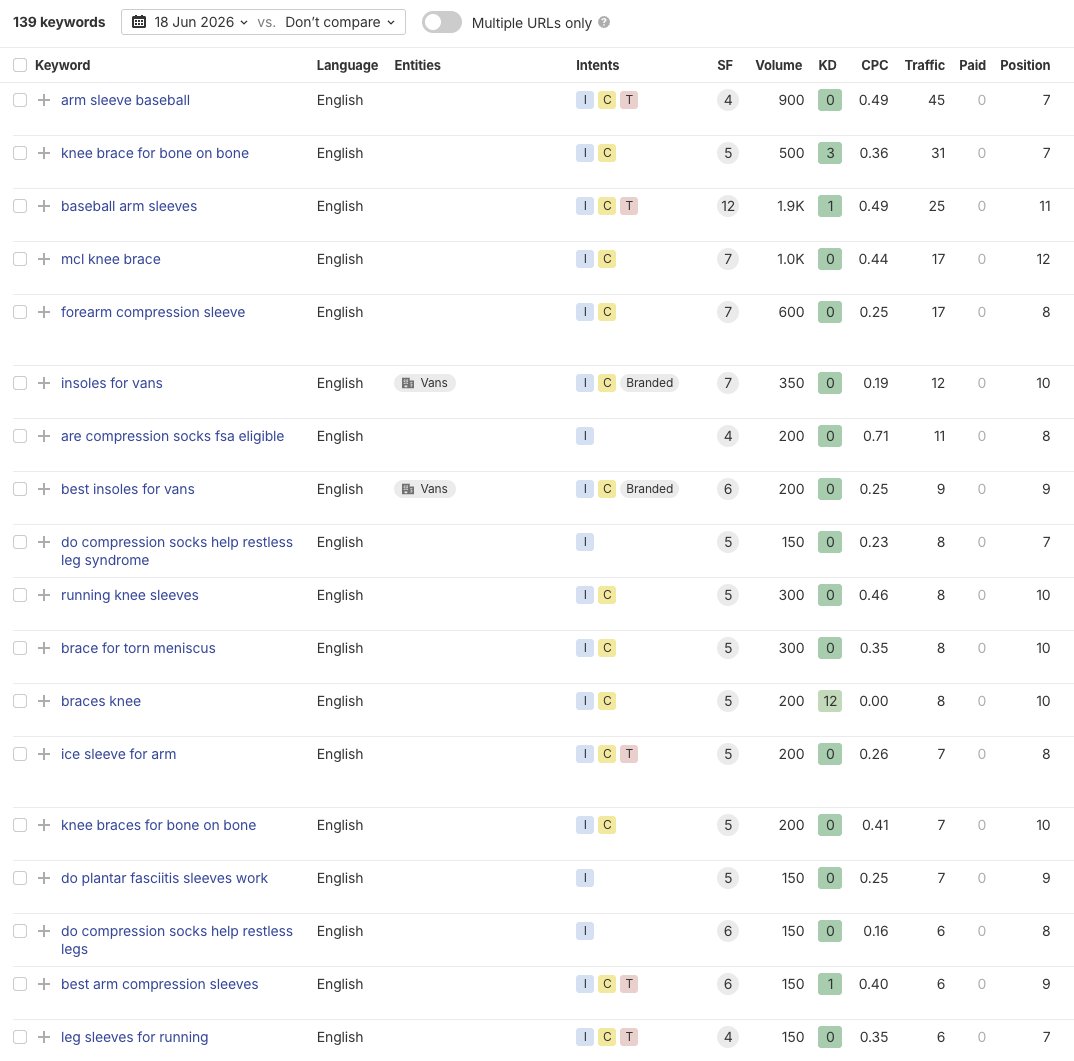
Most ecommerce SEO advice focuses on chasing brand-new keywords. That's a long game. If you want results in days, not months, the smarter move is to look at what you already rank for but aren't getting clicks on.
According to Backlinko's analysis of over 4 million Google search results, the first organic result gets an average click-through rate of 27.6%. By position #7, that drops below 4%. Anything below position #10 is essentially invisible to most shoppers.
That gap between ranking and getting clicks is your opportunity. Google has already decided your page is relevant. You just need to help it understand how relevant.
Keywords sitting in positions #7-15 have cleared the hardest hurdle: they're indexed, they're being evaluated by Google, and they already have some authority behind them. A few targeted edits can be enough to move them onto page one.
How to find your low-hanging fruit keywords
Open Ahrefs and go to Site Explorer. Enter your domain, then navigate to Organic Keywords. Filter by position 7-15. You'll get a list of every keyword where you're close but not quite there.
If you don't have Ahrefs, Google Search Console gives you a version of this for free. Go to Performance, then Search Results, and sort by position. Filter to show only queries with an average position between 7 and 15.
Once you have your list, narrow it down. Prioritize keywords that:
- Have meaningful search volume (at least 100-500 searches/month, depending on your niche)
- Are transactional in nature (terms like "buy", "shop", "for sale", or product-specific terms)
- Map to products that matter to your brand's revenue, not just traffic
- Are tied to pages that already have some content to work with
Don't try to fix everything at once. Pick 5-10 keywords to start. Run through the process for each one, then move to the next batch.
The on-page fixes that move rankings
Once you've picked a keyword to target, open the page that's ranking for it. You're going to make a handful of specific changes.
Meta title
The meta title is the most important on-page signal for keyword relevance. If your target keyword isn't in the title, that's the first fix.
Keep it under 60 characters so it doesn't get cut off in search results. Put the keyword near the front when possible. For a product category page selling hiking boots, something like "Waterproof Hiking Boots for Men & Women | [Brand]" works better than "Shop Our Footwear Collection | [Brand]".
Avoid stuffing multiple keyword variations in. One clear, natural title is better than a keyword salad.
Meta description
Meta descriptions don't directly influence rankings, but they affect click-through rate, which does influence rankings indirectly. Include your keyword naturally, and write the description like a short ad for the page. What will shoppers get when they click?
Aim for 120-155 characters. Include a soft call to action: "Browse our full range" or "Ships free over $50" can meaningfully improve clicks.
H1 tag
Every page should have exactly one H1. It should include your primary keyword. For product pages and category pages, this is usually just the product or category name plus a relevant modifier.
If your H1 currently says "Boots" and you're targeting "women's waterproof hiking boots", update it to match. This is a 30-second change that signals to Google exactly what the page is about.
URL slug
This is worth doing carefully. Changing a URL will break existing links unless you set up a 301 redirect, so don't change URLs casually. But if the current slug is something like /product-123 or /category-4, updating it to /womens-waterproof-hiking-boots is worth the extra step of setting up the redirect.
If the URL already contains a reasonable version of your keyword, leave it alone. URL changes carry risk; only make them when the current slug is completely off.
Body content
Add your keyword naturally throughout the page copy. Not in every sentence, but in places where it fits: the opening paragraph, a subheading or two, the product description, and near the end of any longer content sections.
For product pages with little or no text, this is the biggest opportunity. Add 150-300 words of useful, specific content: what the product does, who it's for, why it's worth buying. Google needs text to understand what a page is about. Thin product pages consistently underperform.
As we cover in our guide on on-page SEO for ecommerce product pages, the combination of keyword-optimized titles and substantive body copy is what separates pages that rank from pages that don't.
Internal linking: the step most people skip
After you've updated the page itself, there's one more move that can accelerate your results: internal links.
Find other pages on your site that already have backlinks pointing to them. Your homepage, your most popular blog posts, or your top category pages are good candidates. Add a link from those pages to the page you just updated.
Why does this work? Backlinks pass what SEOs call "link equity" through a site. When a page with external links points to another page, it shares some of that authority. Internal linking is one of the few ways you can redistribute existing authority across your site without doing any outreach or content creation.
According to Moz, internal links are a key factor in how Google discovers and prioritizes pages. A page buried three levels deep with no internal links gets crawled less frequently and passes fewer ranking signals than one that's well-connected to the rest of your site.
Practically speaking: find 2-3 relevant spots on high-authority pages and add a natural link with descriptive anchor text. "Shop our waterproof hiking boots" is better anchor text than "click here".
Our guide on internal linking strategy for ecommerce sites covers this in more depth if you want to build a more systematic approach.
What to expect and when
Google crawls active ecommerce sites frequently. After you make changes, you can request indexing via Google Search Console to speed things up. Go to URL Inspection, paste the page URL, and click "Request Indexing".
In most cases, you'll see ranking movement within 3-7 days. Some pages respond faster, some slower. If a page doesn't move after two weeks, it's worth checking whether the keyword is more competitive than it first appeared, or whether the page has technical issues holding it back.
According to Ahrefs, 96.55% of pages get zero organic traffic from Google. The pages that do rank have clear keyword signals, adequate content, and links pointing to them. The process above addresses all three.
Track your results in Ahrefs or Search Console. Look at ranking changes and organic clicks week over week. Revenue attribution is harder to isolate, but if you're on Shopify or WooCommerce, you can connect Google Analytics to track organic sessions that lead to purchases.
Common mistakes to avoid
Targeting keywords that don't match the page's intent. If someone searching for a keyword wants to read a comparison article and you send them to a product page, the page probably won't rank no matter how well-optimized it is. Match keyword intent to page type.
Making changes to dozens of pages at once. It's tempting to bulk-update everything, but you won't be able to tell what worked. Do 5-10 pages at a time, track the results, then move to the next batch.
Ignoring mobile. Most ecommerce traffic is on mobile. A page that's technically optimized but slow or hard to use on a phone will see ranking gains capped by poor user experience signals. Our guide on mobile SEO for ecommerce walks through what to check.
Changing URLs without redirects. If you update a URL slug and don't set up a 301 redirect, any backlinks to the old URL stop working. That's a ranking drop, not a boost.
Writing keyword-stuffed content. Adding your keyword 20 times in 200 words looks unnatural and Google's algorithms are good at detecting it. Write for the shopper first. If the keyword fits naturally, use it. If it doesn't, find a different phrasing.
Scaling this across your whole site
Once you've worked through your first batch of keywords, you have a repeatable process. Export your full list of position 7-15 keywords, sort by search volume, and work through them in order of priority.
For a mid-size ecommerce store with a few hundred product and category pages, this process alone can produce meaningful organic revenue growth over a quarter. You're not building new pages or chasing new audiences. You're converting existing Google interest into actual clicks.
This approach pairs well with a broader content strategy. Our guide on ecommerce content strategy for organic growth covers how to build on these quick wins with longer-term traffic assets.
The basic math: if you move 20 keywords from position #10 to position #4, and each keyword gets 200 searches/month, you're potentially adding thousands of monthly visitors who were already looking for what you sell.
FAQ
How do I find keywords ranking between positions 7-15 without Ahrefs? Google Search Console is free and shows average position for every keyword your site ranks for. Go to Performance > Search Results, filter by position, and look for queries averaging between 7 and 15. It's less detailed than Ahrefs but covers the basics well.
How long does it take to see results after updating a page? Most sites see ranking movement within 3-7 days after Google recrawls the updated page. You can speed this up by requesting indexing through Google Search Console's URL Inspection tool. Competitive keywords may take longer.
Should I update the URL slug if it doesn't contain the target keyword? Only if the current slug is completely unrelated to the keyword. URL changes require a 301 redirect to preserve existing link equity. If the slug is just slightly off, leave it and focus on the meta title, H1, and content instead.
How many internal links should I add to a page I'm trying to rank? Aim for 2-4 internal links from relevant, high-authority pages on your site. More than that can look unnatural. Focus on pages that already have external backlinks pointing to them, and use descriptive anchor text that includes your target keyword.
What if my product page has no written content at all? Add at least 150-300 words of useful, specific content. Describe what the product is, who it's for, key features, and why a shopper should buy it. Thin pages consistently rank below pages with substantive content, even when other on-page signals are strong.