 PocketSEO
How to diagnose and recover lost SEO rankings: a step-by-step framework

Daniel Foley Carter @foley_seo
Key Takeaway
Recovering lost SEO rankings requires diagnosing the root cause before making any fixes. Segment your Search Console data by brand vs. non-brand, subfolder, and core update dates to pinpoint where losses occurred. Then work through five areas in parallel: technical SEO, content quality, link profile, indexing health, and user engagement. Track recovery using query counts at the URL level and log every change with annotations, not just overall traffic.
Why do rankings drop in the first place?
Traffic losses rarely have a single cause. Most drops trace back to a mix of technical decay, content that's gone stale, a weak link profile, or indexing problems that compound quietly over time. Before you fix anything, you need to know which category you're dealing with.
Here's the process a specialist SEO agency uses to diagnose and recover lost rankings — broken into six stages you can apply to your own site.
What does a full SEO audit actually cover?
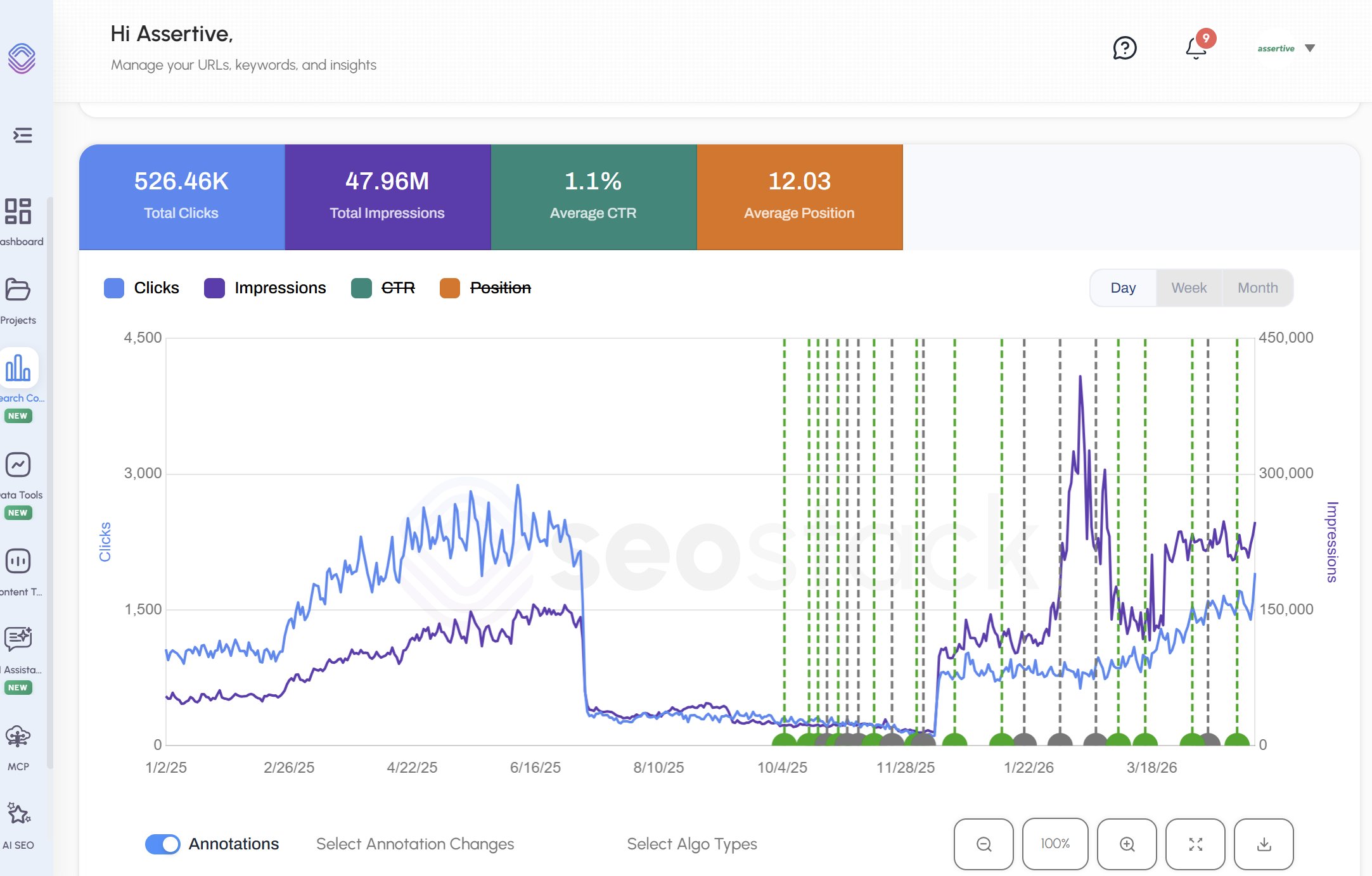
A proper audit isn't one thing — it's seven parallel checks:
- Search Console data: impressions, clicks, crawl errors, manual actions
- Technical SEO: rendering, HTTP headers, URL structure, directives
- Page indexing: which pages are indexed, which aren't, and why
- Performance and rendering: how Google sees your pages vs. how users do
- Content: quality, freshness, depth, NLP signals, engagement metrics
- Link profile: domain authority, anchor distribution, accruement rate, topical trust flow
- User experience: scroll depth, click patterns, bounce behavior via tools like Microsoft Clarity and GA4
Running these in parallel saves weeks compared to a sequential approach.
How do you find where traffic actually dropped?
Segmenting your data is what separates a guess from a diagnosis. Break performance into:
- Brand vs. non-brand queries — brand drops often signal reputation or SERP feature changes; non-brand drops usually point to content or technical issues
- Subfolder performance — losses concentrated in /blog/ vs. /products/ vs. the root point to different fixes
- Year-over-year click gap (last 3 months) — removes seasonality from the picture
- Pre and post core update segments — if a drop aligns with a Google algorithm update date, that's diagnostic information
According to Google's own documentation, core updates specifically reassess content quality signals across an entire site — so a broad drop after an update date is a strong signal to prioritize content quality fixes.
How do you rule out the most common causes?
Before building a recovery plan, eliminate the obvious culprits:
- Spam issues — check for spammy inbound links or low-quality content that may have triggered a manual action
- Technical problems — broken internal links, crawl blocks, rendering failures, or misconfigured redirects
- Indexing issues — pages marked noindex, duplicate content problems, or canonicalization errors pulling pages out of the index
- Content quality — thin content, outdated information, poor readability, weak NLP signals
- Link quality — toxic anchor profiles, a stalled accruement rate, or referring domains that have lost their own traffic
Check Search Console's Coverage and Manual Actions reports first. Then cross-reference with your crawl tool of choice (Screaming Frog, Sitebulb, etc.).
What should a recovery strategy look like?
Once you know what's broken, build a parallel workstream so fixes happen simultaneously rather than sequentially:
- Technical track: prioritize highest-impact fixes first (indexing blocks, rendering issues, internal linking). Log each fix with an annotation in GA4.
- Content track: identify underperforming URLs by segment, update stale content, improve depth and structure, then monitor query count changes per URL
- Link track: build a proper link earning strategy targeting topically relevant referring domains, not just raw domain count
- Measurement track: track query counts at the URL, URL group, and domain level — not just overall traffic, which masks what's actually moving
How do you know if recovery is working?
Track these specific KPIs rather than overall traffic:
- Query counts per URL and URL group
- Non-brand impressions and clicks
- Index coverage rate (indexed vs. submitted pages)
- Engagement metrics per content segment (scroll depth, time on page)
- New link accruement rate month over month
Annotate every significant change in GA4. Without annotations, you can't connect cause and effect when rankings shift.
Ranking recovery isn't fast — most algorithm-related losses take three to six months to reverse after fixes are in place. But the diagnosis phase, done properly, tells you exactly where to spend that time.
Want the full playbook? Read our guide on Google Search Console: Setup to Your First SEO Win (20-Minute Guide).