 PocketSEO
Claude AI Keyword Optimization: What Actually Works in 2026
Transform Search Console data into 59,200+ new visitors using AI-powered keyword insights.
Last updated: June 2026

Hridoy Reh @hridoyreh on Twitter/X
Jun 14, 2026 · 8d ago
Updated June 2026
Understanding the Claude AI + Search Console Strategy
This method combines Google Search Console data with Claude AI's analysis power to find hidden keyword opportunities. The core principle: your pages already rank for keywords you're not actively targeting. By identifying and optimizing for these "underserved keywords," you can increase traffic without creating new content.
The strategy works because Google already considers your content relevant for these searches. You're simply making that relevance more explicit through strategic optimization.

Setting Up Google Search Console Data Export
Start by accessing your Google Search Console dashboard and selecting your target website. Navigate to the Performance section to access your search data.

Select a 3-month data range for your analysis. Three months provides enough data volume while keeping insights current. Shorter periods may not show consistent patterns, while longer periods might include outdated ranking factors.
Click on the "Pages" tab to view individual URL performance. This shows which specific pages on your site are receiving impressions and clicks.

Select a page that receives decent traffic but has room for improvement. Pages with high impressions but lower click-through rates are ideal candidates.
Export the data by clicking the Export button and downloading the CSV file. This file contains the raw keyword data Claude will analyze.
Analyzing Keywords with Claude AI
Upload your CSV file to Claude AI. The key is using the right prompt to extract actionable insights from the data.
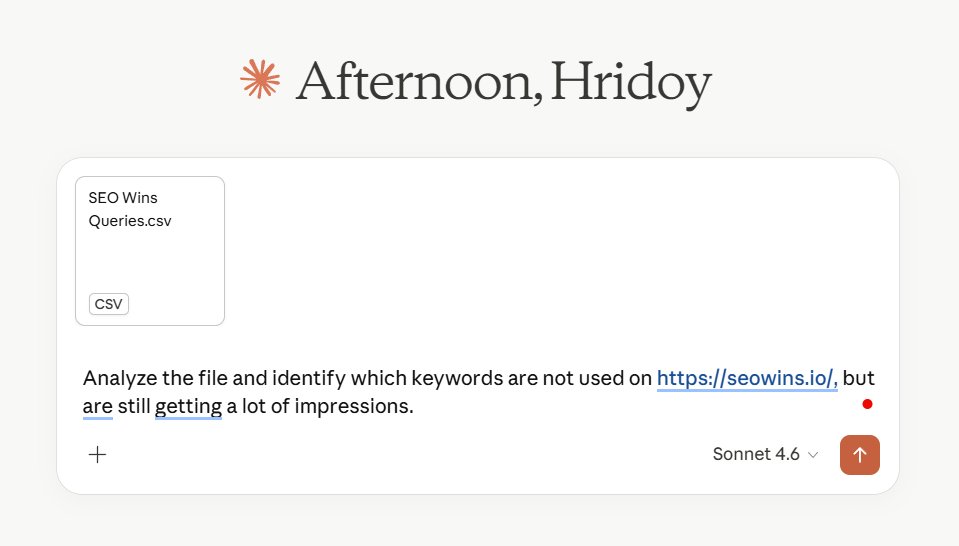
Use this specific prompt: "Analyze the file and identify which keywords are not used on [that page/content URL] but are still getting a lot of impressions."
Claude will process the data and identify keywords where your page appears in search results but doesn't explicitly target those terms. These are your optimization opportunities.

Claude's analysis reveals keywords with high impression volume that you're missing. These keywords represent immediate traffic potential because Google already shows your content for these searches.
Implementing Strategic Keyword Integration
Document the underserved keywords Claude identifies. Create a spreadsheet with columns for the keyword, current impressions, and planned placement strategy.
Integrate these keywords naturally into your existing content:
Headings and Subheadings: Add relevant keywords to H2 and H3 tags where they fit contextually. This signals topic relevance to search engines.
Body Paragraphs: Weave keywords into existing paragraphs. Focus on maintaining readability while increasing keyword density.
Image Alt Text: Update image descriptions to include relevant keywords. This helps with both accessibility and SEO.
FAQ Sections: Create or expand FAQ sections using identified keywords as question frameworks.
Meta Descriptions: Update page meta descriptions to include high-impression keywords.
Avoid keyword stuffing by maintaining a natural keyword density of 1-2% for your target terms. The content should read naturally to human visitors.
Content Optimization Best Practices
When integrating new keywords, maintain content quality and user experience. Each keyword addition should add value, not just increase keyword density.
Use semantic variations of your target keywords. Instead of repeating "dog training tips" exactly, use variations like "canine training advice" or "puppy training techniques."
Update internal linking to support your newly optimized content. Link from other relevant pages using your target keywords as anchor text.
Monitor keyword placement across different content elements:
- Title tags (include primary keywords)
- Meta descriptions (include 1-2 target keywords)
- First paragraph (establish topic relevance early)
- Conclusion (reinforce main topics)
Measuring and Tracking Results
Track performance changes in Google Search Console after implementing optimizations. Focus on these metrics:
Impressions: Should increase for newly targeted keywords Click-through Rate: May initially dip as you rank for more competitive terms Average Position: Track ranking improvements for target keywords Total Clicks: The ultimate success metric

Set up monitoring for your optimized pages. Check performance weekly for the first month, then monthly thereafter.
Document your results to identify which types of keyword integration work best for your content. This data informs future optimization efforts.
Scaling the Process Across Your Site
Repeat this process for multiple pages on your website. Start with your highest-traffic pages, as these offer the biggest potential impact.
Prioritize pages with:
- High impression volume
- Lower-than-expected click-through rates
- Strong domain authority signals
- Recent content that's still relevant
Create a content optimization schedule. Process 2-3 pages per week to avoid overwhelming your workflow while maintaining consistent progress.
Develop templates for common optimization patterns. If FAQ sections work well for one page, create FAQ templates for similar content.
Advanced Tips for Maximum Impact
Combine this strategy with seasonal keyword analysis. Run the process quarterly to catch emerging search trends and seasonal variations.
Use Claude to analyze competitor keywords by uploading their visible content and asking for keyword gap analysis compared to your optimized pages.
Set up automated monitoring using Google Search Console API connections to track optimization results without manual checking.
Consider user intent when placing keywords. Informational keywords work better in blog content, while commercial keywords suit product pages.
Test different keyword placement strategies on similar pages to identify what works best for your audience and niche.
This data-driven approach removes guesswork from keyword optimization. By targeting keywords where you already have search presence, you're building on existing Google trust signals rather than starting from scratch.
 Get the weekly SEO digest