 PocketSEO
Get a High-Authority Backlink from WordPress.com (Most People Miss This)

Kalash @kalashvasaniya
Reviewed Jul 2026
Key Takeaway
WordPress.com's massive domain authority makes it a goldmine for backlinks that most site owners completely overlook. Create a free WordPress.com subdomain, publish genuine content that naturally links back to your main website, then keep it minimally active with occasional updates. This legitimate approach works because you're using the platform as intended while benefiting from its trusted status with search engines. The backlink remains permanent and carries significant weight since it comes from one of the web's most authoritative domains.
What hidden backlink opportunity does WordPress.com offer that most people miss?
WordPress (not the software, but the hosting platform) has a domain authority that ranks among the internet's highest.
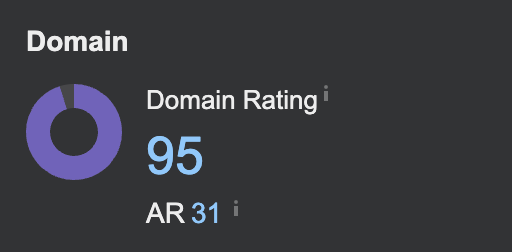
According to Ahrefs, WordPress has a domain rating of 94 out of 100, making it one of the most authoritative domains on the internet. Yet most site owners completely ignore a simple way to get a backlink from this powerhouse domain.
How do you claim your free high-authority backlink from WordPress.com?
When you create a WordPress.com account, even a free one, you get a subdomain like yoursite.wordpress.com. Here's the key: you can redirect this subdomain to your main website.
Step-by-Step Process
- Create a WordPress.com account if you don't have one
- Set up a basic site on your subdomain (yourname.wordpress.com)
- Add a few posts that mention your main website
- Include natural links back to your primary domain
- Set up domain forwarding (available on paid plans) or use strategic internal linking
Why does this WordPress.com backlink strategy actually work?
WordPress.com carries massive link equity. When you create content there that naturally links to your main site, you're essentially getting a backlink from one of the web's most trusted domains.
How can you maximize the SEO impact of your WordPress.com backlink?
- Write genuine content on your WordPress.com site, not just placeholder text
- Use your real brand name in the subdomain if possible
- Link naturally within relevant content context
- Keep the WordPress.com site active with occasional updates
What are the best tips for quickly implementing this WordPress.com strategy?
This isn't about gaming the system. WordPress.com genuinely allows users to link to their other web properties. The key is making your WordPress.com presence legitimate and valuable.
Most people either don't know about this opportunity or dismiss it as too simple to be effective. That's exactly why it works.
What's the bottom line on getting backlinks from WordPress.com?
You're not breaking any rules or using black-hat techniques. You're simply using WordPress.com as intended while strategically benefiting from its domain authority. Set this up once, and you have a permanent high-authority backlink pointing to your site.
Want the full playbook? Read our guide on Image Backlinks: The Underrated Link-Building Play for 2026.