 PocketSEO
Build browser extensions for 99 DR backlinks from extension stores

Pablo Santana @PabloSantanaT
Reviewed Jul 2026
Key Takeaway
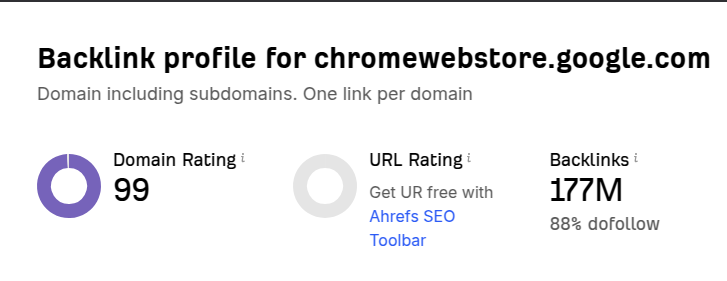
Browser extension stores like Chrome Web Store and Firefox Add-ons have domain ratings near 99, making them goldmines for high-authority backlinks. Create simple utility extensions like password generators or color pickers using frameworks like Plasmo, then include your website URL in the extension description and developer profile. Distribute across Chrome, Firefox, Edge, and Opera stores for multiple DR 90+ backlinks. Extension stores review submissions, so build genuinely useful tools rather than spam. This approach delivers both powerful SEO links and potential lead generation through your extension's user base.
Why do extension stores provide such massive link juice for SEO?
Chrome Web Store and Firefox Add-ons have domain ratings around 99.
When you publish a browser extension, you can include your website URL in the description and developer profile — giving you a dofollow backlink from one of the most authoritative domains on the web.
How do you create a simple browser extension specifically for link building?
You don't need complex coding skills. Start with a basic utility extension:
- Password generator — Simple tool that creates secure passwords
- Color picker — Lets users grab hex codes from any webpage
- Tab manager — Organizes browser tabs into groups
- Timer/Pomodoro — Basic productivity timer
Use frameworks like Plasmo or WXT to build extensions quickly. You can also hire a developer on Upwork for $200-500.
How do you optimize your extension listing for maximum link value?
Include your main URL in multiple places:
- Extension description (natural context about your main business)
- Developer website field in your account profile
- Support/help links within the extension
Make it genuinely useful. Extension stores review submissions. A low-quality tool gets rejected, wasting your effort.
What's the best distribution strategy for extensions beyond just Chrome?
Don't stop at Chrome Web Store. Publish to:
- Firefox Add-ons (DR 98)
- Edge Add-ons (DR 95)
- Opera Add-ons (DR 90)
Each platform gives you another high-authority backlink pointing to your site.
How can you use your extension as a lead magnet bonus?
Your extension becomes a lead generation tool. Add subtle calls-to-action within the extension UI that drive users to sign up for your main product. You're getting both the backlink AND potential customers.
This strategy works because extension stores want quality tools for their users. Build something people actually want to use, and you'll get both the SEO benefit and real business value.
Want the full playbook? Read our guide on Image Backlinks: The Underrated Link-Building Play for 2026.