 PocketSEO
How to Recover Your Google Discover Traffic in 2026
Proven tactics to get unfiltered and reclaim your personalized feed visibility.
Last updated: July 3, 2026

Guilhem Chauvin @GuilhemChauvin on Twitter/X
Jun 6, 2026 · 1mo ago
Updated July 3, 2026
What Happened: Understanding Google Discover Filtering
Google Discover can be a goldmine for traffic, but it's also notoriously unpredictable. When your site gets filtered out, you lose access to what can be hundreds of thousands of daily clicks from users browsing their personalized feeds.
The filtering usually happens for specific reasons:
- Content quality concerns
- User engagement signals dropping
- Algorithm updates changing content preferences
- Technical issues affecting crawlability
- Policy violations (even minor ones)
Unlike traditional search traffic, Discover traffic depends heavily on Google's assessment of your content's appeal to mobile users who are passively consuming information.
Signs Your Site Has Been Filtered from Discover
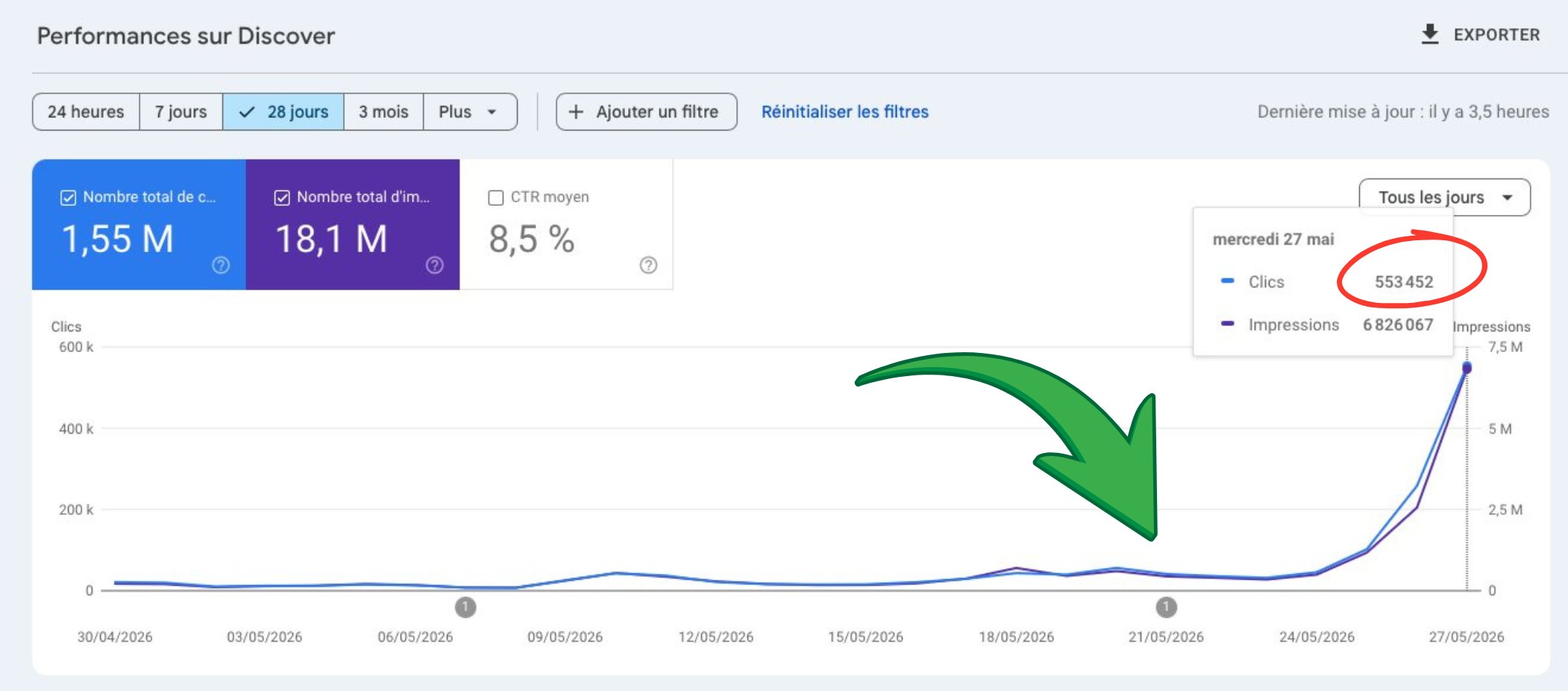
Before diving into recovery tactics, confirm you've actually been filtered:
- Discover impressions drop to zero or near-zero
- Previously performing content stops appearing
- Overall mobile traffic decreases significantly
Traffic patterns show:
- Sudden drop in mobile referral traffic from Google
- Decrease in 'unknown' or 'direct' traffic (often misattributed Discover clicks)
- Lower engagement from mobile users
Content performance indicators:
- Articles that previously got Discover traffic show flat performance
- New content fails to gain traction despite good search performance
Content Quality Audit: The Foundation of Recovery
The first step in recovery involves a brutal content audit. Google Discover prioritizes high-quality, engaging content above all else.
Review recent content for:
- Thin or duplicate content
- Clickbait headlines that don't match content
- Poor user experience signals
- Outdated information
- Low-value aggregated content
Focus on E-A-T signals:
- Author credibility and expertise
- Clear authorship attribution
- Factual accuracy and citations
- Regular content updates
- User-generated engagement (comments, shares)
Remove or improve:
- Articles with high bounce rates
- Content with spelling/grammar errors
- Posts that violate Google's content policies
- Outdated news or information
- Thin affiliate content
Many sites make the mistake of keeping low-quality content live. For Discover recovery, it's often better to remove questionable content entirely than try to fix everything.
Technical SEO Fixes for Discover Recovery
Discover relies heavily on technical signals, especially for mobile users.
Core Web Vitals optimization:
- Largest Contentful Paint under 2.5 seconds
- First Input Delay under 100 milliseconds
- Cumulative Layout Shift under 0.1
Mobile-first requirements:
- Responsive design that works perfectly on mobile
- Fast loading images (use WebP format)
- Clean, readable fonts at mobile sizes
- Easy navigation without zoom requirements
Structured data implementation:
- Article schema markup
- Organization schema
- Author schema with social profiles
- FAQ schema where relevant
Image optimization:
- High-quality images (minimum 1200px wide)
- Proper alt text for accessibility
- Compressed file sizes for fast loading
- Multiple image formats for different devices
Check these technical elements:
- XML sitemaps include all important content
- Robots.txt doesn't block Googlebot
- HTTPS implementation is complete
- Canonical tags are properly set
User Experience Signals That Matter
Google Discover pays close attention to how users interact with your content once they arrive.
Engagement metrics to improve:
- Time on page (aim for 2+ minutes average)
- Pages per session
- Return visitor rate
- Social sharing rates
- Comment engagement
Content presentation tactics:
- Break up long text with subheadings
- Use bullet points and numbered lists
- Include relevant images every 200-300 words
- Add video content where appropriate
- Create easy-to-scan content structure
Mobile user experience:
- Thumb-friendly navigation elements
- Readable text without pinch-to-zoom
- Fast-loading pages (under 3 seconds)
- Minimal pop-ups or intrusive elements
- Easy social sharing buttons
Internal linking strategy:
- Link to related content to increase session duration
- Use descriptive anchor text
- Create topic clusters around main themes
- Update old posts with links to newer content
Content Strategy for Discover Success
Recovering from a Discover filter requires strategic content creation that aligns with what Google's algorithm values.
Topic selection:
- Focus on trending topics in your niche
- Create timely content around current events
- Cover topics your audience actively discusses
- Avoid overly promotional or sales-focused content
Content formats that perform well:
- How-to guides with clear steps
- News analysis and commentary
- List articles (but avoid clickbait)
- Behind-the-scenes content
- Expert interviews and quotes
Publishing consistency:
- Maintain regular publishing schedule
- Update existing content regularly
- Create content series around popular topics
- Respond to trending conversations quickly
Content depth and value:
- Aim for 1500+ words on important topics
- Include original research or data when possible
- Add unique perspectives or insights
- Create actionable content users can implement
Monitoring Recovery Progress
Tracking your recovery requires watching multiple metrics across different timeframes.
Google Search Console metrics:
- Discover impressions (check weekly)
- Click-through rates from Discover
- Performance by content type
- Mobile vs desktop traffic splits
Google Analytics indicators:
- Referral traffic from Google (not organic search)
- Mobile traffic patterns
- User engagement metrics
- Bounce rate improvements
Third-party tracking:
- Social media sharing rates
- Brand mention tracking
- Competitor analysis in similar niches
- Industry ranking tracking
Recovery timeline expectations:
- Initial improvements: 2-4 weeks
- Significant traffic return: 1-3 months
- Full recovery: 3-6 months
- Traffic may exceed previous levels
Don't expect overnight results. Discover recovery is typically a gradual process as Google rebuilds trust in your content quality.
Common Mistakes That Prevent Recovery
Content mistakes:
- Publishing too much content too quickly
- Focusing on quantity over quality
- Ignoring mobile user experience
- Creating content solely for SEO
- Not removing low-quality existing content
Technical mistakes:
- Ignoring Core Web Vitals scores
- Poor mobile page experience
- Slow server response times
- Broken internal linking structure
- Missing or incorrect structured data
Strategy mistakes:
- Impatience with the recovery timeline
- Not monitoring the right metrics
- Trying to game the system with artificial signals
- Ignoring user feedback and engagement
- Not staying consistent with content quality
Recovery sabotage:
- Making too many changes at once
- Not documenting what changes were made
- Reverting successful changes too quickly
- Focusing only on traffic numbers, not engagement
- Giving up before the algorithm has time to reassess
Long-term Strategies to Avoid Future Filtering
Once you recover Discover traffic, maintaining it requires ongoing attention to quality and user experience.
Build sustainable practices:
- Regular content audits and cleanup
- Consistent publishing of high-quality content
- Ongoing technical SEO maintenance
- User experience testing and improvements
- Community building and engagement
Stay informed about changes:
- Follow Google's official communications
- Monitor industry news about Discover updates
- Track competitor performance in Discover
- Test new content formats and topics
- Adapt to changing user preferences
Quality control systems:
- Editorial review process for all content
- Regular technical audits
- User feedback collection and implementation
- Performance tracking and optimization
- Team training on quality standards
Recovering from a Google Discover filter is possible, but it requires patience, systematic improvements, and a genuine commitment to creating valuable content for mobile users. The sites that successfully recover often come back stronger than before, with better content quality and user engagement across all traffic sources.
FAQ
How long does it take to recover Google Discover traffic? Recovery is gradual, not overnight, because Google needs time to rebuild trust in your content quality. Expect initial improvements within 2 to 4 weeks, significant traffic return in 1 to 3 months, and full recovery in 3 to 6 months. In many cases, traffic eventually exceeds previous levels once quality and engagement improve across your whole site.
How do I know if my site was filtered from Google Discover? Confirm filtering before acting by checking Google Search Console for Discover impressions dropping to zero or near-zero and previously performing content vanishing. Traffic patterns often show a sudden drop in mobile referral traffic and a decrease in "unknown" or "direct" traffic, which frequently hides misattributed Discover clicks. New content also fails to gain traction despite good search performance.
Should I delete low-quality content to recover Discover traffic? Yes, removing questionable content is often better than trying to fix everything. Start with a brutal content audit targeting thin or duplicate content, clickbait headlines, high bounce rates, outdated news, and thin affiliate posts. Many sites make the mistake of keeping low-quality content live, which drags down Google's overall assessment of your content's appeal to mobile users.
What technical fixes help restore Google Discover traffic? Discover relies heavily on mobile technical signals, so start with Core Web Vitals: Largest Contentful Paint under 2.5 seconds, First Input Delay under 100 milliseconds, and Cumulative Layout Shift under 0.1. Add Article, Organization, Author, and FAQ structured data, use high-quality images at least 1200px wide in WebP format, and confirm robots.txt does not block Googlebot.
What engagement signals matter most for Google Discover? Google Discover watches how mobile users interact with content after arriving. Aim for time on page averaging 2-plus minutes, strong pages per session, and healthy return visitor and social sharing rates. Improve these by breaking text with subheadings, adding images every 200 to 300 words, using thumb-friendly navigation, keeping pages loading under 3 seconds, and internally linking related content to extend sessions.