 PocketSEO
5 SaaS Page Types That Actually Drive Organic Traffic
Beyond homepages and blogs: the landing pages your prospects are searching for.
Last updated: July 3, 2026
Why Most SaaS Sites Are Missing Easy SEO Wins
If your SaaS only has a homepage and blog, you're missing out on thousands of potential visitors every month. Most SaaS founders focus on product features while ignoring how their prospects actually search.
The reality? People don't search for your brand name. They search for solutions to their problems, alternatives to existing tools, and industry-specific needs. This guide covers the 5 page types that capture this search traffic.
Solution Pages: Target Problems, Not Products
Solution pages target the actual problems your software solves, not what you call your product internally.
Why Solution Pages Work
Most people search "appointment scheduling software" before they search "Calendly." They have a problem and need a solution. Your solution pages should be there when they search.
How to Build Solution Pages
- List your core problems: What specific problems does your software solve?
- Research problem-based keywords: Use tools like Ahrefs or SEMrush to find how people search for these problems
- Create dedicated pages: One page per major problem/solution
- Focus on the problem first: Start with the pain point, then introduce your solution
Example Solution Page Structure
- H1: "Best [Problem] Solution for [Target]"
- Problem description: Explain the specific pain point
- Your solution: How your product solves it
- Features that matter: Only the ones relevant to this specific problem
- Social proof: Testimonials from customers who had this exact problem
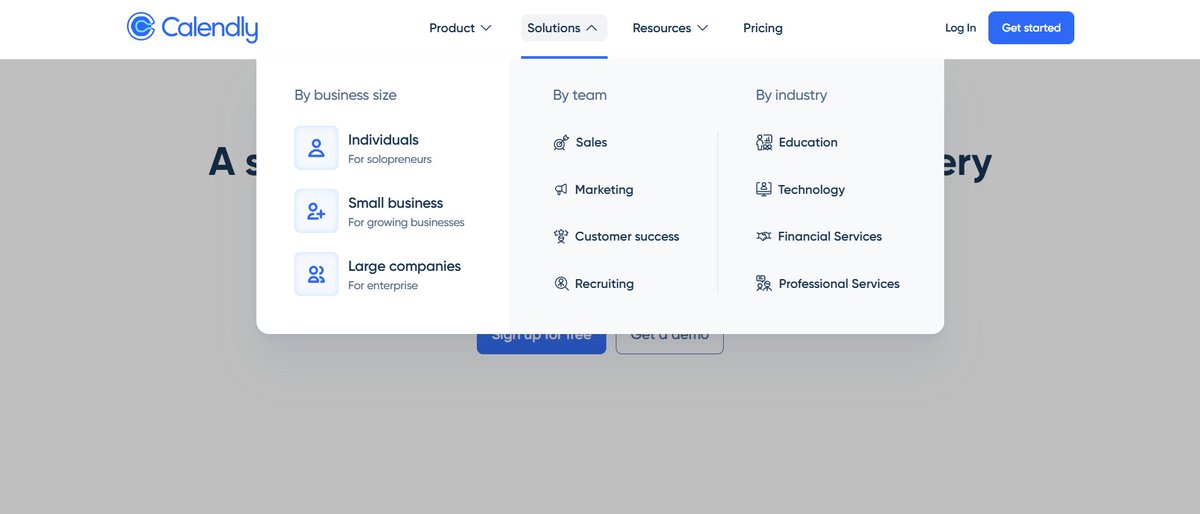
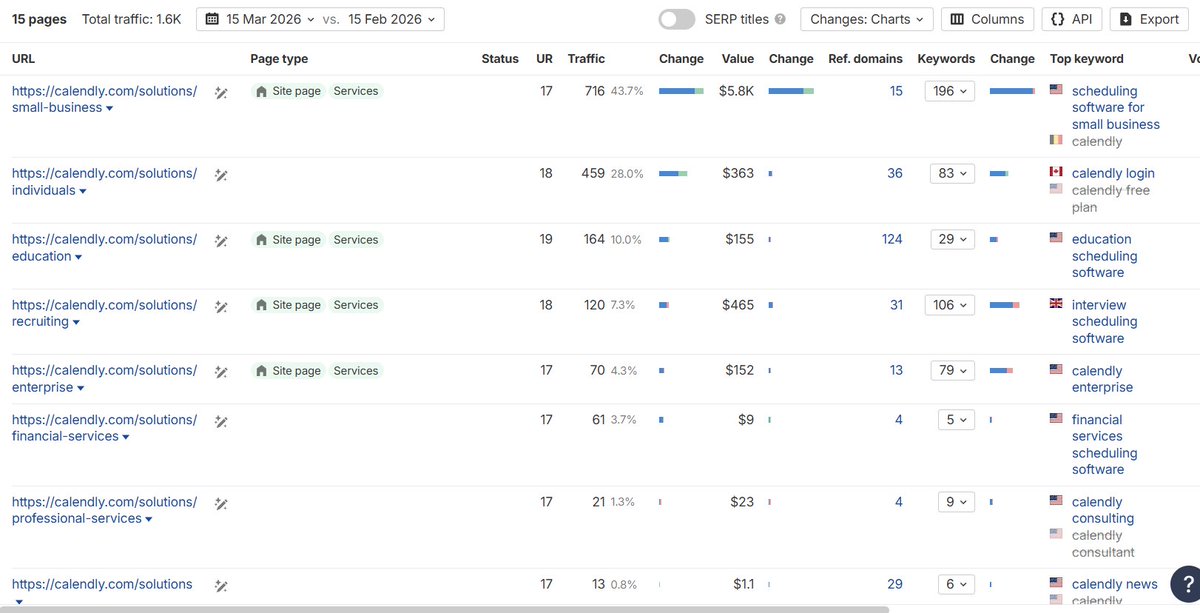
Calendly nails this with pages like "scheduling software for small business" and "education scheduling software."
Industry Pages: Speak Your Customer's Language
Industry pages target specific verticals or niches your product serves. This is where programmatic SEO really shines.
The Industry Page Opportunity
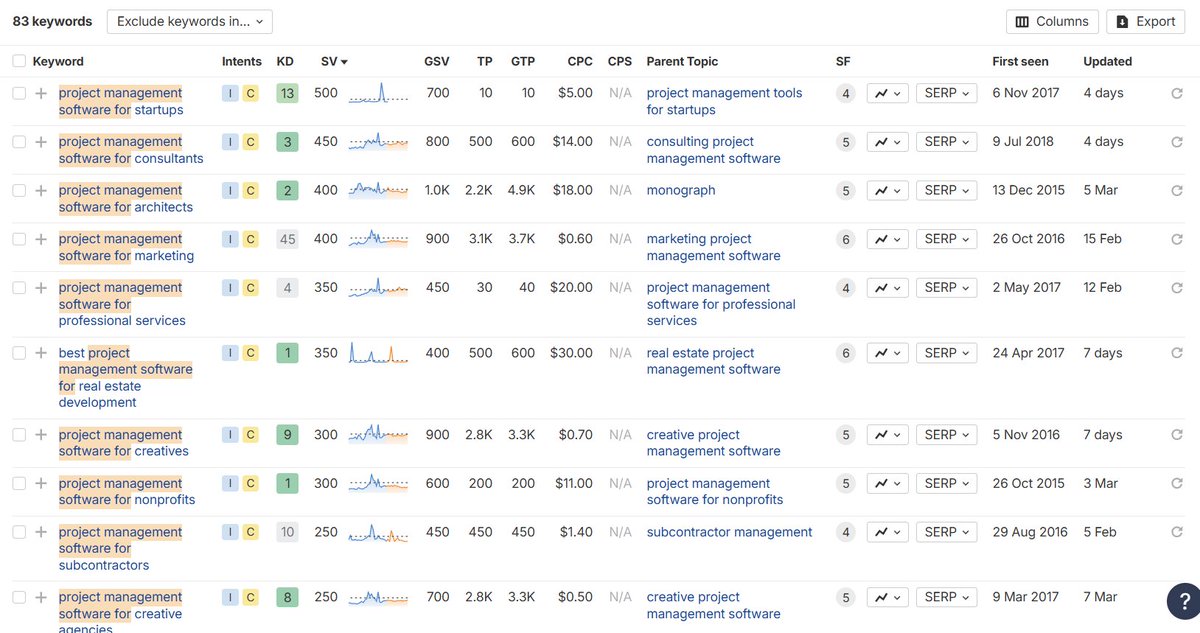
If you sell project management software, don't just target "project management software." Target:
- Project management software for agencies
- Project management software for construction
- Project management software for healthcare
Each industry has unique pain points, language, and buying patterns.
Building Industry Pages at Scale
- Identify your top industries: Look at your current customer base
- Research industry-specific keywords: What terms do people in construction vs. healthcare use?
- Create industry-specific content: Address unique challenges each industry faces
- Use AI smartly: Generate first drafts, then customize for authenticity
Industry Page Template
- H1: "[Your Product] for [Industry]"
- Industry challenges: Specific problems this industry faces
- Your solution: How you solve industry-specific problems
- Industry features: Highlight relevant functionality
- Case studies: Success stories from this industry
- Industry integrations: Tools this industry commonly uses
Alternative Pages: Capture Competitor Traffic
Alternative pages target people actively shopping for solutions - they just haven't found you yet.
High-Intent Keywords to Target
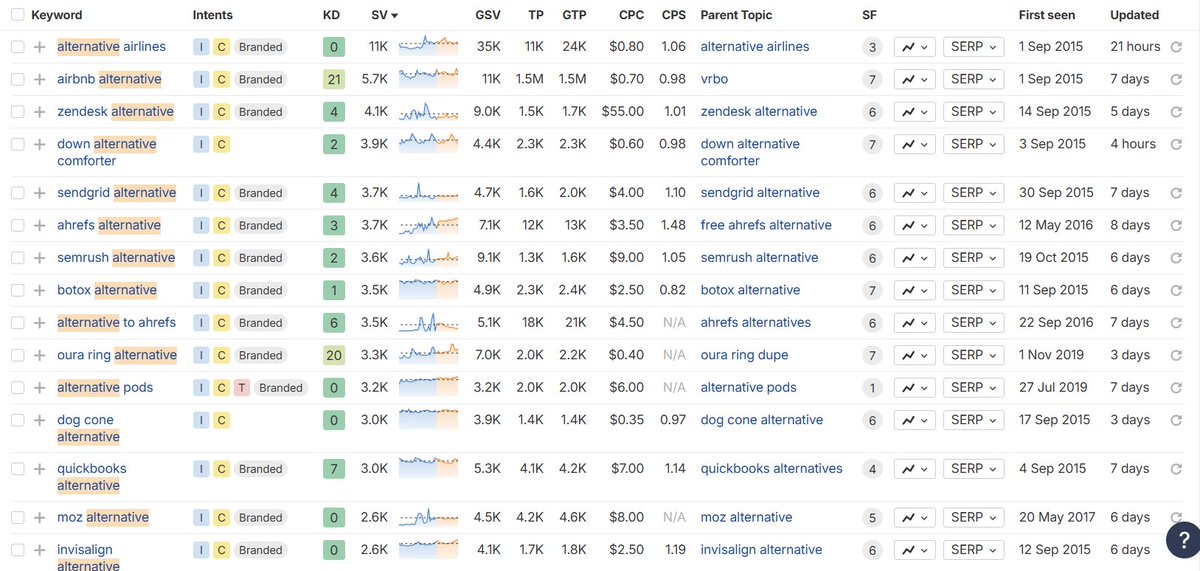
People search:
- "Best [Competitor] alternatives"
- "[Competitor] vs [Other Competitor]"
- "[Competitor] alternative for small business"
These searchers already know they have a problem and they're actively comparing solutions.
How to Build Alternative Pages That Convert
- List your main competitors: Focus on direct competitors in your space
- Research alternative keywords: What do people search when looking for alternatives?
- Take a neutral tone: Actually review the competitor fairly
- Position yourself strategically: Be the top recommendation without being obvious
Alternative Page Structure
- H1: "Best [Competitor] Alternatives in 2024"
- Brief competitor overview: What they do well
- Competitor limitations: Where they fall short (be fair)
- Alternative options: List 5-7 alternatives including yourself
- Your solution: Why you're the best choice for specific use cases
- Comparison table: Feature comparison
This is one of the highest-converting page types for SaaS. Don't skip it.
Integration Pages: Capture LLM and Search Traffic
Integration pages target people looking for tools that work with their existing software stack.
Why Integration Pages Matter Now
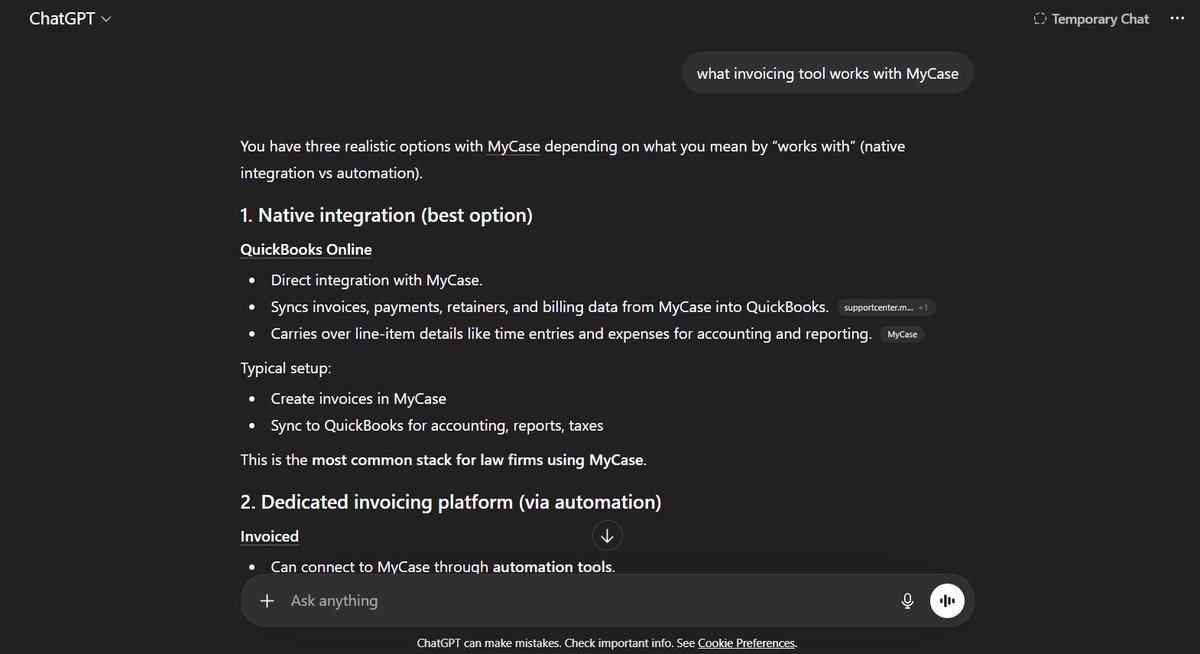
When someone asks ChatGPT "what invoicing tool works with MyCase?", it searches for results. If you don't have a page ready, you don't exist in that conversation.
One B2B SaaS gets 1-2 leads every week from a single integration page.
Building Integration Pages
- List all your integrations: Every tool your product connects with
- Prioritize popular tools: Start with the most-used integrations in your space
- Target specific combinations: "[Your Tool] + [Popular Tool] integration"
- Include setup instructions: Make it actionable
Integration Page Template
- H1: "[Your Product] + [Other Tool] Integration"
- Integration benefits: Why this combination is powerful
- Setup guide: Step-by-step instructions
- Use cases: How customers use this integration
- Screenshots: Visual proof it works
- Getting started: Clear next steps
Focus especially on niche, industry-specific tools your competitors ignore.
Location Pages: Scale with Geographic SEO
Location pages work when your product has a local or regional angle.
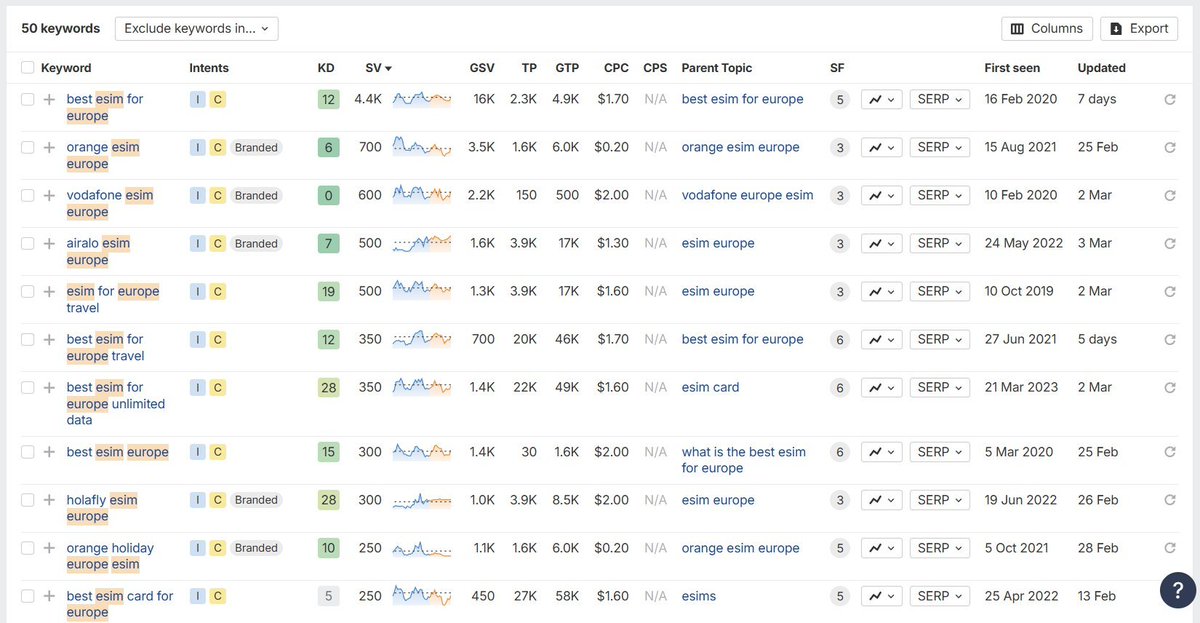
When Location Pages Make Sense
This strategy works when location changes buying intent:
- eSIM providers (different countries need different plans)
- Tax software (different states have different laws)
- Payment processors (different countries have different regulations)
- Compliance tools (regulations vary by location)
Location Page Examples
- "Best eSIM for USA"
- "Best eSIM for Europe"
- "Best eSIM for Japan"
- "GDPR compliance software for UK businesses"
- "Sales tax software for California"
Building Location Pages
- Identify relevant locations: Where does geography affect your product value?
- Research local keywords: How do people in different locations search?
- Create location-specific content: Address local needs, regulations, or preferences
- Avoid keyword stuffing: Only build pages where location genuinely matters
Location Page Structure
- H1: "[Your Product] for [Location]"
- Local context: Why this location has specific needs
- Local features: Functionality specific to this location
- Local case studies: Success stories from this area
- Local compliance: Any regional requirements you meet
Don't force this strategy. If location doesn't change buying intent, skip it.
Getting Started: Which Pages to Build First
Priority Order
- Solution pages: Start here - highest impact
- Alternative pages: Quick wins with high-intent traffic
- Integration pages: If you have popular integrations
- Industry pages: Scale after you nail the first three
- Location pages: Only if geography matters for your product
Implementation Tips
- Start with 2-3 pages in each category
- Test and measure what works for your audience
- Use tools like Google Search Console to find gaps
- Monitor competitor pages for inspiration
- Update pages regularly with fresh content
Common Mistakes to Avoid
- Building pages just for SEO without user value
- Keyword stuffing instead of natural language
- Copying competitor pages exactly
- Forgetting to optimize for conversions
- Not tracking performance metrics
Measuring Success
Track these metrics for each page type:
- Organic traffic growth
- Keyword rankings
- Conversion rates
- Lead quality
- Time on page
- Bounce rate
Most SaaS sites see 30-50% organic traffic increases within 6 months of implementing these page types systematically.
Start with solution pages - they typically deliver the fastest results and highest conversion rates.
FAQ
Which SaaS page type should I build first for SEO? Start with solution pages, since they typically deliver the fastest results and highest conversion rates. This guide ranks the priority order as solution pages, then alternative pages, integration pages, industry pages, and finally location pages. Solution pages target the actual problems your software solves, capturing searchers who look up "appointment scheduling software" before they ever search a brand name like Calendly.
What is the difference between solution pages and industry pages? Solution pages target the specific problem your software solves, using an H1 like "Best [Problem] Solution for [Target]." Industry pages target a vertical or niche, using an H1 like "[Your Product] for [Industry]," such as project management software for agencies, construction, or healthcare. Each industry has unique pain points and language, which makes industry pages ideal for programmatic SEO at scale.
Do integration pages actually generate leads for SaaS companies? Yes. The guide cites one B2B SaaS company that gets 1 to 2 leads every week from a single integration page. Integration pages target people looking for tools that work with their existing stack, using an H1 like "[Your Product] + [Other Tool] Integration." They also capture LLM traffic: when someone asks ChatGPT which tool works with a specific product, your page must exist to appear in that answer.
How do I build alternative pages without trashing competitors? Take a neutral tone and review the competitor fairly, noting what they do well before covering where they fall short. List 5 to 7 alternatives including yourself, then position your solution as the top recommendation for specific use cases without being obvious. Use an H1 like "Best [Competitor] Alternatives" and add a feature comparison table. This is one of the highest-converting page types for SaaS.
When should a SaaS company skip location pages? Skip location pages when geography does not change buying intent. They only make sense when location genuinely affects product value, such as eSIM providers, tax software with different state laws, payment processors facing country regulations, or compliance tools. Examples include "Best eSIM for USA" or "Sales tax software for California." Avoid keyword stuffing and never force geographic pages just to chase SEO volume.