 PocketSEO
628K New Impressions Without Publishing a Single New Post
Five fixes you can run on existing pages this week to get more clicks and higher rankings.
Last updated: July 3, 2026

Flavio Amiel @fba on Twitter/X
Jun 17, 2026 · 21d ago
Updated July 3, 2026
Publishing new content takes time. Optimizing what you already have takes an afternoon. This guide walks through five steps that generated 628,443 new impressions and 12,699 additional clicks — all from pages that already existed.
Why existing pages are your fastest growth lever
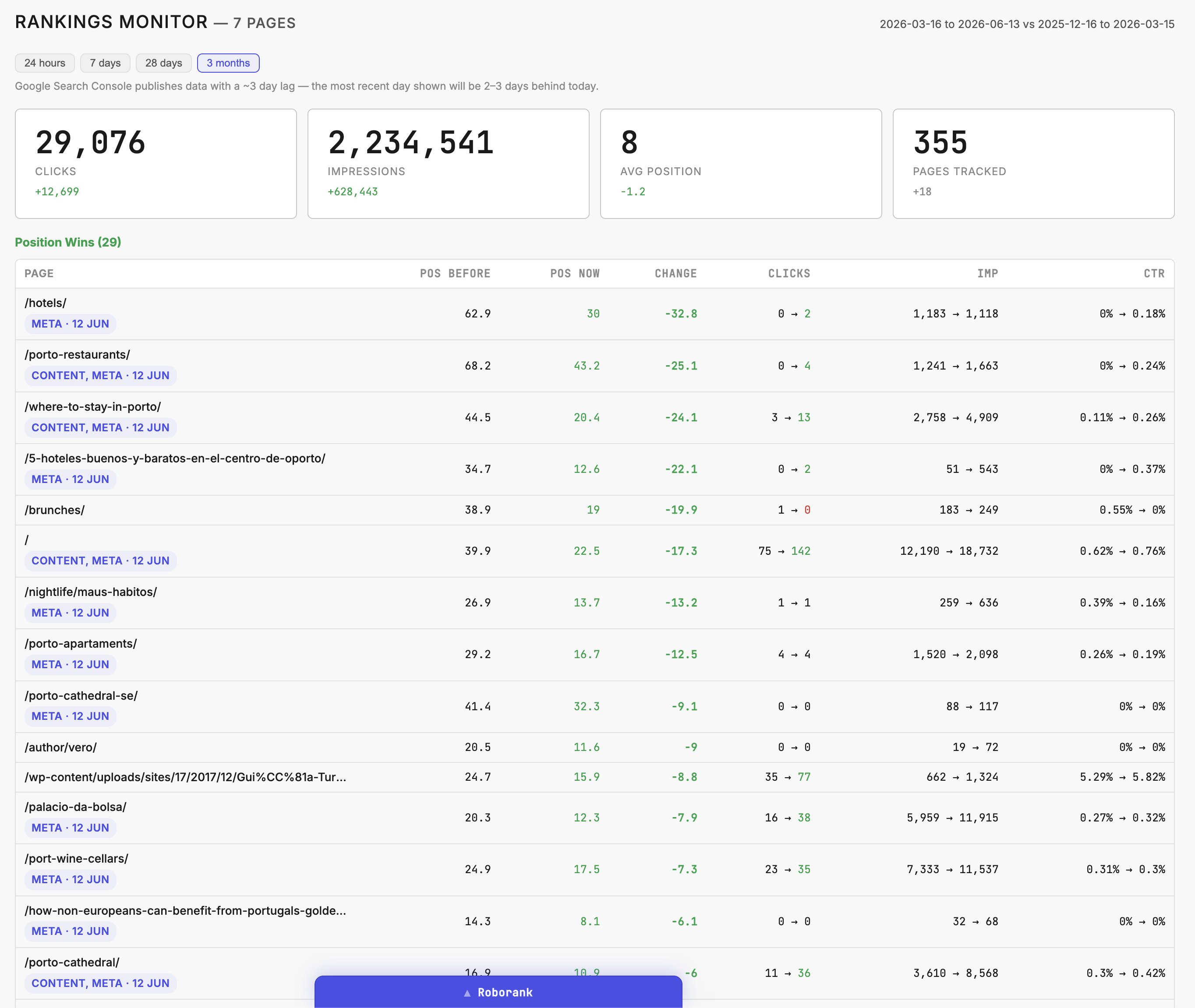
According to Ahrefs, 96.55% of pages get zero organic traffic from Google. Most of those pages aren't doomed — they're just neglected. Google is often already crawling them, sometimes even surfacing them in search results. The opportunity is sitting in your Search Console account right now.
Backlinko's analysis of 4 million Google search results found that moving from position 3 to position 1 can increase CTR by over 75%. That means small ranking improvements on existing pages compound fast.
None of the steps below require you to write a new article.
Step 1: Refresh your metadata
Your meta title is the first thing a searcher sees. If it doesn't make them want to click, nothing else matters.
Open Google Search Console, go to the Performance report, and sort pages by impressions. For each high-impression page, look at the current title tag. Ask yourself: would you click this over the other results on the page?
Four things that consistently lift CTR:
Numbers signal specificity. "12 LinkedIn tools that save hours per week" outperforms "The best LinkedIn tools" because readers know exactly what they're getting.
Named entities add credibility and context. Mentioning a recognizable brand, person, or place ("Eiffel designed Porto's Dom Luiz Bridge") draws the eye because it's concrete.
Authority signals borrow trust. "A Stanford nutritionist's take on intermittent fasting" lands differently than "What to know about fasting."
Keyword matching matters more than people admit. Pull the exact query terms from Search Console that are driving impressions to a page, then check whether those words appear in the title tag. If they don't, add them.
On meta descriptions: yes, Google sometimes rewrites them. Update them anyway. A well-written description that expands on your title, includes the target keyword, and ends with a clear reason to click will outperform a blank or auto-generated one. Test it over 30 days and check CTR in Search Console before writing it off.
One practical move: open an incognito window and search the keyword you're targeting. Read the top five titles. What patterns do they use? What are they missing? Your title needs to stand out from that specific page, not from some abstract ideal.
Step 2: Hunt for high-impression, low-CTR pages
This is where Search Console earns its keep.
Go to Performance > Search Results. Click the "Pages" tab, then add a filter to show only pages with more than 500 impressions. Sort by CTR ascending. What you're looking for: pages Google is already showing to searchers, but almost nobody is clicking.
Think of it as Google telling you the page has relevance signals but the snippet isn't doing its job.
Two things cause low CTR on high-impression pages:
- The title and description aren't pulling people in (fix with Step 1).
- The page doesn't have enough internal links to rank high enough for the impression to convert to a click.
If a page sits at position 12 average, it shows up at the bottom of page one or the top of page two. Impressions accumulate, clicks don't. Moving from position 12 to position 6 can triple CTR. Internal links are one of the fastest ways to push a page up those positions.
Step 3: Build internal links with the right anchor text
Most sites, when audited, show that the majority of pages have one or two internal links pointing to them. Some have zero. That's a structural problem Google notices.
PageRank still flows through internal links. A page buried three clicks from your homepage with no contextual links pointing to it will struggle to rank, even if the content is excellent.
The fix:
For each low-CTR page you identified in Step 2, find five to ten other pages on your site that cover related topics. Add a contextual link from those pages to your target page. The link should sit inside the body content, not in a footer or sidebar, and the surrounding text should be relevant to the target page's topic.
Anchor text matters. Use descriptive anchors that include words related to the target page's keyword. Avoid generic anchors like "click here" or "read more."
To find internal linking opportunities at scale:
- Use Screaming Frog (free up to 500 URLs) to crawl your site and see which pages have the fewest inlinks.
- Use the site search operator in Google:
site:yourdomain.com "keyword phrase"to find existing pages that mention the topic but don't yet link to the target page.
If you run a blog with 50 posts, this process takes two to three hours. The impact shows up in Search Console within four to eight weeks.
Step 4: Refresh your existing content
Google's quality rater guidelines explicitly mention content freshness as a quality signal for many query types. For anything date-sensitive (statistics, tools, regulations, best practices), an article written three years ago may be getting outranked by newer versions from competitors.
The process doesn't need to be elaborate:
- Pull your top 20 pages by impressions from Search Console.
- Check when each was last updated (visible in your CMS).
- Flag any page older than 12 months that covers a topic where information changes (software tools, pricing, statistics, trends).
- Update those pages: swap outdated stats for current ones, remove dead links, add new sections where the topic has evolved.
When you update a page, also change the published or modified date in your CMS so Google picks up the refresh signal.
Here's the part most people skip: go back to Search Console and look at what queries are driving impressions to a page. If you're getting impressions for a phrase that doesn't appear in your content, add it. Google is already associating your page with that term. Matching your content to that query makes the association stronger.
For example: your page on email marketing ranks for "email marketing for e-commerce" but that phrase appears nowhere in the article. Add a section addressing it. You're not guessing what to write — Google is telling you what searchers want from your page.
Step 5: Tighten your topical authority with a hub-and-spoke structure
Topical authority is how Google measures whether a site is a reliable source on a subject. A site with 40 loosely related posts on vaguely connected topics signals less authority than a site with 15 tightly organized posts that clearly cover one subject from multiple angles.
The hub-and-spoke model organizes content around a central "hub" page (a broad overview of a topic) supported by "spoke" pages (detailed articles on specific subtopics). The hub links to each spoke, and each spoke links back to the hub.
Example structure for a site about email marketing:
- Hub: "Email marketing for small businesses" (broad overview)
- Spoke 1: "How to build an email list from scratch"
- Spoke 2: "Email subject line best practices"
- Spoke 3: "Email automation workflows for beginners"
- Spoke 4: "How to measure email marketing ROI"
Each spoke links back to the hub. The hub links to each spoke. Internal links between related spokes reinforce the cluster.
To build this without starting from scratch:
- List every piece of content you've published.
- Group them by topic cluster.
- Identify which piece in each cluster should serve as the hub (usually the broadest, highest-traffic page).
- Check whether the internal linking structure reflects that hierarchy. If it doesn't, fix it.
A topical map doesn't need to be complicated. A spreadsheet with three columns (hub page, spoke pages, linking status) is enough. The goal is to make the structure explicit so you can audit it and spot gaps.
According to SEMrush's ranking factors study, websites with strong topical depth on a subject consistently outrank those with broader but shallower coverage. Building this structure into your existing content is one of the most durable ways to hold rankings over time.
Putting it together: a realistic timeline
Week 1: Audit your top 30 pages in Search Console. Update metadata on the highest-impression, lowest-CTR pages.
Week 2: Run an internal link audit using Screaming Frog or a similar tool. Add links to your five most underlinked pages.
Week 3: Refresh the three oldest high-traffic pages with updated statistics, revised sections, and any missing query terms from Search Console.
Week 4: Map your content into topic clusters. Identify your hub pages and verify the linking structure supports them.
Month 2 onward: Check Search Console weekly. Watch for CTR improvements on updated pages. Repeat the internal linking and content refresh process on the next batch.
None of these steps require new content. They require attention to what's already there. Most of the signal Google needs to rank your pages higher is already sitting in your account, waiting to be acted on.
FAQ
How do I find low-CTR pages in Google Search Console? Open Performance, click the Search Results report, then the "Pages" tab. Add a filter to show only pages with more than 500 impressions and sort by CTR ascending. This surfaces pages Google already shows to searchers but almost nobody clicks, meaning the page has relevance signals while the snippet fails to earn clicks.
What makes a meta title get more clicks? Four elements consistently lift CTR: numbers that signal specificity, named entities that add concrete context, authority signals that borrow trust, and exact keyword matching. Pull the query terms driving impressions from Search Console, then confirm those words appear in your title tag. If they don't, add them so the title matches what searchers actually type.
Does refreshing old content actually improve rankings? Yes. Google's quality rater guidelines explicitly cite content freshness as a quality signal for many query types. Pull your top 20 pages by impressions, flag anything older than 12 months on date-sensitive topics, then swap outdated stats, remove dead links, and add missing sections. Update the modified date in your CMS so Google picks up the refresh signal.
How many internal links should point to a page? Aim for five to ten contextual links per target page. Most audited sites show the majority of pages have only one or two internal links, and some have zero, which Google notices. Place links inside body content using descriptive anchor text that includes the target keyword. Avoid generic anchors like "click here" or "read more."
How long until on-page SEO changes show results? Internal linking improvements typically show up in Search Console within four to eight weeks. For a 50-post blog, the linking process takes two to three hours. Moving a page from position 12 to position 6 can triple CTR, and Backlinko found that going from position 3 to position 1 can raise CTR by over 75%, so small gains compound quickly.